Swing/_JTextPane のバックアップ(No.47)
- バックアップ一覧
- 差分 を表示
- 現在との差分 を表示
- 現在との差分 - Visual を表示
- ソース を表示
- Swing/_JTextPane へ行く。
- 1 (2012-05-14 (月) 11:59:01)
- 2 (2012-09-03 (月) 06:03:42)
- 3 (2012-12-10 (月) 00:01:01)
- 4 (2012-12-17 (月) 00:05:13)
- 5 (2012-12-24 (月) 00:45:14)
- 6 (2013-01-28 (月) 00:01:41)
- 7 (2013-02-11 (月) 00:10:19)
- 8 (2013-04-01 (月) 00:07:36)
- 9 (2013-04-19 (金) 20:40:21)
- 10 (2013-05-06 (月) 00:00:33)
- 11 (2013-05-13 (月) 00:26:06)
- 12 (2013-08-26 (月) 00:03:41)
- 13 (2013-09-09 (月) 00:47:16)
- 14 (2013-10-07 (月) 00:12:07)
- 15 (2014-01-13 (月) 00:01:21)
- 16 (2014-04-28 (月) 00:09:05)
- 17 (2014-05-25 (日) 03:11:58)
- 18 (2014-07-07 (月) 00:30:33)
- 19 (2014-09-04 (木) 22:17:33)
- 20 (2014-09-05 (金) 14:54:22)
- 21 (2014-10-13 (月) 10:44:25)
- 22 (2014-11-08 (土) 01:33:33)
- 23 (2014-11-10 (月) 00:02:53)
- 24 (2014-11-14 (金) 02:27:36)
- 25 (2014-11-19 (水) 01:31:07)
- 26 (2014-11-20 (木) 01:37:15)
- 27 (2014-11-25 (火) 02:38:39)
- 28 (2014-11-28 (金) 01:24:43)
- 29 (2014-12-01 (月) 00:04:05)
- 30 (2014-12-24 (水) 14:51:15)
- 31 (2015-02-16 (月) 00:01:12)
- 32 (2015-03-02 (月) 00:15:53)
- 33 (2015-03-16 (月) 01:10:49)
- 34 (2015-04-20 (月) 00:00:38)
- 35 (2015-07-06 (月) 01:52:37)
- 36 (2015-08-31 (月) 04:03:24)
- 37 (2015-09-14 (月) 03:56:32)
- 38 (2015-11-16 (月) 00:50:28)
- 39 (2015-11-23 (月) 04:27:01)
- 40 (2016-04-04 (月) 00:38:58)
- 41 (2016-04-07 (木) 14:10:26)
- 42 (2016-06-24 (金) 15:08:25)
- 43 (2016-11-28 (月) 02:11:32)
- 44 (2017-02-20 (月) 19:40:38)
- 45 (2017-02-28 (火) 17:51:53)
- 46 (2017-09-06 (水) 21:16:57)
- 47 (2017-09-11 (月) 15:53:23)
- 48 (2018-02-15 (木) 14:23:42)
- 49 (2018-07-30 (月) 04:04:52)
- 50 (2018-11-15 (木) 15:23:23)
- 51 (2018-12-17 (月) 15:36:06)
- 52 (2019-01-28 (月) 16:27:59)
- 53 (2019-07-29 (月) 02:31:12)
- 54 (2019-08-12 (月) 20:51:41)
- 55 (2019-09-16 (月) 01:32:47)
- 56 (2019-10-28 (月) 02:40:07)
- 57 (2020-01-13 (月) 03:52:51)
- 58 (2020-03-09 (月) 18:30:25)
- 59 (2020-10-12 (月) 03:25:32)
- 60 (2021-03-01 (月) 00:26:05)
- 61 (2022-03-07 (月) 01:58:18)
- 62 (2023-02-20 (月) 11:13:14)
- 63 (2023-06-05 (月) 03:15:50)
- 64 (2025-03-24 (月) 03:19:37)
- 65 (2025-04-07 (月) 09:54:51)
- 66 (2025-08-11 (月) 02:15:44)
- title: JTextPane JEditorPane StyledDocument
tags: [JTextPane, JEditorPane, StyledDocument]
description: JTextPane、JEditorPane、StyledDocument関係の記事へのスクリーンショット付きリンク一覧
このページでは、
JTextPane、JEditorPaneなどのStyledDocument関係のコンポーネントの使い方を集めて一覧にしています。
- JTextPane JEditorPane JTextArea
- ↑10 ↓11
- JEditorPaneのHTMLタグにToolTipTextを設定する
- JTextPaneに追加するコンポーネントのベースラインを揃える
- JEditorPaneのStyleSheetを使ってlist bulletを画像に変更
- JTextPaneを一行に制限してスタイル可能なJTextFieldとして使用する
- JEditorPaneのHTMLDocumentからIDでElementを取得する
- JEditorPaneで選択色を半透明化
- JTextPaneで検索結果のハイライト表示と文字色変更を同時に行う
- JEditorPaneに読み込んだHTMLを画像に変換する
- JTextPaneにTabSetを設定してTabStopの文字列揃えをテストする
- JTextPaneにJSeparatorを追加する
- ↑20 ↓21
JTextPane JEditorPane JTextArea
JEditorPaneで改行を表示

JEditorPaneで改行を表示
JEditorPaneのパラグラフ終了位置に改行を意味する図形を追加表示します。
JTextPaneで全角スペースやタブを可視化

JTextPaneで全角スペースやタブを可視化
JTextPaneに表示した文字列中の全角スペースやタブを可視化します。
JEditorPaneで長い行を折り返さない

JEditorPaneで長い行を折り返さない
JEditorPaneや、JTextPaneで、行をViewportの幅で折り返さないよう設定します。
JTextPaneでキーワードのSyntaxHighlight

JTextPaneでキーワードのSyntaxHighlight
JTextPaneでキーワードのSyntax Highlightを行います。
JTextPaneで最終行に移動

JTextPaneで最終行に移動
CaretPositionを指定してJTextPaneの最終行に移動します。
JTextPaneでタブサイズを設定

JTextPaneでタブサイズを設定
JTextPaneのStyledDocumentが使用するパラグラフ属性として、タブストップが展開する文字数を設定します。
JTextPaneに修飾した文字列を挿入

JTextPaneに修飾した文字列を挿入
JTextPaneに、スタイル付けした文字列を挿入して、ログ風に表示します。
JEditorPaneのHTMLEditorKitにCSSを適用

JEditorPaneのHTMLEditorKitにCSSを適用
JEditorPaneにStyleSheetを追加したHTMLEditorKitを設定します。
JEditorPaneやJTextPaneに行間を設定する

JEditorPaneやJTextPaneに行間を設定する
JEditorPaneやJTextPaneに行間を設定します。
JEditorPaneにリンクを追加

JEditorPaneにリンクを追加
JEditorPaneに追加したリンクのクリックイベントなどをHyperlinkListenerで処理します。
↑10 ↓11
JEditorPaneのHTMLタグにToolTipTextを設定する

JEditorPaneのHTMLタグにToolTipTextを設定する
JEditorPaneでdivやspanタグのtitle属性をToolTipで表示できるように設定します。
JTextPaneに追加するコンポーネントのベースラインを揃える

JTextPaneに追加するコンポーネントのベースラインを揃える
JTextPaneに追加するコンポーネントのベースラインが他の文字列などとを揃うように設定します。
JEditorPaneのStyleSheetを使ってlist bulletを画像に変更

JEditorPaneのStyleSheetを使ってlist bulletを画像に変更
JEditorPaneのHTMLEditorKitからStyleSheetを取得し、list-style-imageを使ってList bulletを変更します。
JTextPaneを一行に制限してスタイル可能なJTextFieldとして使用する

JTextPaneを一行に制限してスタイル可能なJTextFieldとして使用する
JTextPaneの行数を一行のみに制限して、文字色などのスタイル付けが可能なJTextFieldとして使用します。
JEditorPaneのHTMLDocumentからIDでElementを取得する

JEditorPaneのHTMLDocumentからIDでElementを取得する
JEditorPaneに設定したHTMLDocumentを検索してid属性を持つElementを取得します。
JEditorPaneで選択色を半透明化

JEditorPaneで選択色を半透明化
JEditorPaneで選択色を半透明化し、HighlightPainterによるハイライトやCSSでの背景色変更と組み合わせた場合の描画のテストを行います。
JTextPaneで検索結果のハイライト表示と文字色変更を同時に行う

JTextPaneで検索結果のハイライト表示と文字色変更を同時に行う
Highlighter.HighlightPainterを使用したハイライト表示では文字色を変更することが出来ないので、JTextPaneにStyleを適用してこれを同時に行います。
JEditorPaneに読み込んだHTMLを画像に変換する

JEditorPaneに読み込んだHTMLを画像に変換する
JEditorPaneに画像付きのHTMLを読み込み、描画が完了した段階で全体のスクリーンショットを撮る方法をテストします。
JTextPaneにTabSetを設定してTabStopの文字列揃えをテストする

JTextPaneにTabSetを設定してTabStopの文字列揃えをテストする
JTextPaneのパラグラフ属性にTabSetを設定し、TabStopによる文字列の揃えをテストします。
JTextPaneにJSeparatorを追加する

JTextPaneにJSeparatorを追加する
JTextPaneにセパレータとして、hr要素やJSeparator、MatteBorderを設定したJLabelなどを追加します。
↑20 ↓21
JEditorPaneに設定したフォントをHTMLテキストに適用する
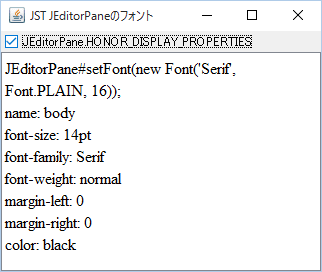
JEditorPaneに設定したフォントをHTMLテキストに適用する
HTMLEditorKitでbodyタグにデフォルトで指定されている文字サイズではなく、JEditorPaneに設定したフォントをHTMLテキストで使用します。
JTextPaneに入力した文字をアイコンに変換する

JTextPaneに入力した文字をアイコンに変換する
JTextPaneに入力した文字を顔文字アイコンに変換して表示します。
JEditorPaneのHTMLDocumentに要素を追加する

JEditorPaneのHTMLDocumentに要素を追加する
JEditorPaneのHTMLDocumentからtable要素を取得し、その子要素としてtr要素などを追加します。
JEditorPaneに表示したリンク上にカーソルが乗ったとき文字色を変更する

JEditorPaneに表示したリンク上にカーソルが乗ったとき文字色を変更する
JEditorPaneに表示したリンクで:hover擬似クラスのような効果を行うためのHyperlinkListenerを設定します。
JListのセルレンダラーとして設定したJEditorPaneからHyperlinkEventを取得する
JListのセルレンダラーとして設定したJEditorPaneからHyperlinkEventを取得する
JListのセルレンダラーとして使用しているJEditorPaneに複数リンクを表示し、マウスクリックイベントを転送してHyperlinkEventが発生するように設定します。
JTextFieldを編集不可のJTextPaneに追加する

JTextFieldを編集不可のJTextPaneに追加する
JTextFieldを空欄として編集不可にしたJTextPaneに追加します。