JTableに列罫線を描画する
Total: 188, Today: 2, Yesterday: 1
Posted by aterai at
Last-modified:
Summary
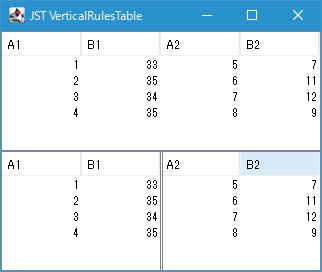
JTableを中央の列で二分割する二重垂直線を描画します。
Screenshot
Advertisement
Source Code Examples
class VerticalRulesLayerUI extends LayerUI<JScrollPane> {
  @Override public void paint(Graphics g, JComponent c) {
    super.paint(g, c);
    if (c instanceof JLayer) {
      Component view = ((JLayer<?>) c).getView();
      if (view instanceof JScrollPane) {
        JScrollPane scroll = (JScrollPane) view;
        JViewport viewport = scroll.getViewport();
        JTable table = (JTable) viewport.getView();
        paintVerticalRules(g, table, scroll);
      }
    }
  }

  private void paintVerticalRules(Graphics g, JTable table, JComponent parent) {
    Graphics2D g2 = (Graphics2D) g.create();
    g2.setPaint(UIManager.getColor("Table.gridColor"));
    int columnCount = table.getModel().getColumnCount();
    if (columnCount % 2 == 0) {
      int center = columnCount / 2 - 1;
      double x1 = table.getCellRect(0, center, false).getMaxX();
      Rectangle r = SwingUtilities.calculateInnerArea(parent, null);
      g2.draw(new Line2D.Double(x1, r.getY(), x1, r.getHeight()));
      double x2 = x1 + 2d; //table.getCellRect(0, center + 1, false).getMinX() + 2d;
      g2.draw(new Line2D.Double(x2, r.getY(), x2, r.getHeight()));
      g2.dispose();
    }
  }
}
Description
JTableとJTableHeaderの親となるJScrollPaneをJLayerでラップして両方の描画を上書きする二重垂直罫線を作成・描画するJTableの列罫線はJTable#setShowVerticalLines(false)で非表示化JTableの内部セル余白もsetIntercellSpacing(new Dimension())で垂直・水平方向ともに0に変更JTableHeader#setReorderingAllowed(false)で列の入れ替えを実行不可に設定JTable#getCellRect(0, center, false)で取得したセル領域の右端に二重線を描画するので、列幅の変更中の描画は可能- 二重垂直線の高さは
SwingUtilities.calculateInnerArea(scroll, null)で取得した親JScrollPaneの高さを使用してJTable内の行数は考慮しない