JTextField内のテキストをJPopupMenuに配置したJTextAreaで複数行編集する
Total: 124, Today: 5, Yesterday: 3
Posted by aterai at
Last-modified:
Summary
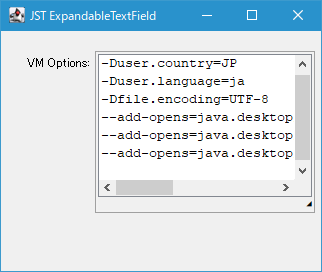
JTextField内の空白区切りの一行テキストをJPopupMenuに配置したJTextAreaにコピーして複数行での編集を可能にします。
Screenshot
Advertisement
Source Code Examples
class ExpandableTextField extends OverlayLayoutPanel {
  private final JTextField textField = new JTextField(20);
  private final JTextArea textArea = new JTextArea();
  private final JPopupMenu popup = new JPopupMenu() {
    private transient PopupMenuListener listener;

    @Override public void updateUI() {
      removePopupMenuListener(listener);
      super.updateUI();
      JPanel footer = new JPanel(new FlowLayout(FlowLayout.RIGHT, 0, 0));
      footer.add(makeResizeLabel(this));
      setLayout(new BorderLayout());
      add(new JScrollPane(textArea));
      add(footer, BorderLayout.SOUTH);
      listener = new ExpandPopupMenuListener();
      addPopupMenuListener(listener);
    }
  };

  protected ExpandableTextField() {
    super();
    ExpandArrowIcon icon = new ExpandArrowIcon();
    JButton expandBtn = makeExpandButton(icon);
    expandBtn.addActionListener(e -> popup.show(textField, 0, 0));
    add(expandBtn);

    textField.setMargin(new Insets(0, 0, 0, icon.getIconWidth()));
    textField.setAlignmentX(RIGHT_ALIGNMENT);
    textField.setAlignmentY(CENTER_ALIGNMENT);
    add(textField);
  }

  @Override public final Component add(Component comp) {
    return super.add(comp);
  }

  private final class ExpandPopupMenuListener implements PopupMenuListener {
    @Override public void popupMenuWillBecomeVisible(PopupMenuEvent e) {
      textArea.setText(textField.getText().replace(" ", "\n") + "\n");
      textArea.requestFocusInWindow();
    }

    @Override public void popupMenuWillBecomeInvisible(PopupMenuEvent e) {
      textField.setText(textArea.getText().replace("\n", " ").trim());
    }

    @Override public void popupMenuCanceled(PopupMenuEvent e) {
      // not need
    }
  }

  private static JLabel makeResizeLabel(JPopupMenu popup) {
    JLabel resizeLabel = new JLabel("?");
    resizeLabel.setCursor(Cursor.getPredefinedCursor(Cursor.SE_RESIZE_CURSOR));
    MouseAdapter resizer = new Resizer(popup);
    resizeLabel.addMouseListener(resizer);
    resizeLabel.addMouseMotionListener(resizer);
    return resizeLabel;
  }

  private static JButton makeExpandButton(ExpandArrowIcon icon) {
    JButton expandBtn = new JButton(icon);
    expandBtn.setMargin(new Insets(0, 0, 0, 0));
    expandBtn.setContentAreaFilled(false);
    expandBtn.setFocusable(false);
    expandBtn.setBorderPainted(false);
    expandBtn.setAlignmentX(RIGHT_ALIGNMENT);
    expandBtn.setAlignmentY(CENTER_ALIGNMENT);
    return expandBtn;
  }

  public void setText(String text) {
    textField.setText(text);
  }
}
Description
JPanelにOverlayLayoutを設定し、JTextFieldと拡大用JButtonを重ねて配置- 拡大用
JButtonがクリックされたらJTextAreaを配置したJPopupMenuをJTextField上に表示PopupMenuListenerを実装してJPopupMenuに設定:PopupMenuListener#popupMenuWillBecomeVisible(...)をオーバーライドし、JTextField内の一行テキストの空白文字を改行文字に置換してJTextAreaにコピーPopupMenuListener#popupMenuWillBecomeInvisible(...)をオーバーライドし、JTextArea内の複数行テキストの改行文字に空白文字に置換してJTextFieldにコピー
JPopupMenuにフッターを追加してリサイズ可能に設定
Reference
- Program arguments, VM options, environment variables | IntelliJ IDEA Documentation
- JTextAreaにフォーカスが当たったときその高さを自動拡張する
- JPasswordFieldでパスワードを可視化する
- JComboBoxのドロップダウンリストの高さをマウスドラッグで変更する