Summary
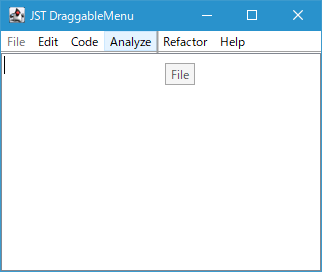
JMenuBarに配置されたトップレベルJMenuをマウスドラッグで並べ替え可能にします。
Screenshot
Advertisement
Source Code Examples
class MenuDragLayerUI extends LayerUI<JMenuBar> {
  private static final int DRAG_THRESHOLD = 8;
  private JMenu draggingMenu;
  private JWindow ghostWindow;
  private JLabel ghostLabel;
  private Point startPt;
  private boolean isDragging;
  private int targetIndex = -1;
  private int dividerX = -1;

  @Override public void installUI(JComponent c) {
    super.installUI(c);
    ((JLayer<?>) c).setLayerEventMask(
        AWTEvent.MOUSE_EVENT_MASK | AWTEvent.MOUSE_MOTION_EVENT_MASK);
    ghostWindow = new JWindow();
    ghostWindow.setOpacity(0.7f);
    ghostLabel = new JLabel();
    ghostLabel.setOpaque(false);
    ghostLabel.setBorder(BorderFactory.createCompoundBorder(
        BorderFactory.createLineBorder(Color.GRAY),
        BorderFactory.createEmptyBorder(2, 5, 2, 5)
    ));
    ghostLabel.setCursor(Cursor.getPredefinedCursor(Cursor.MOVE_CURSOR));
    ghostWindow.add(ghostLabel);
  }

  @Override protected void processMouseEvent(MouseEvent e, JLayer<? extends JMenuBar> l) {
    JMenuBar bar = l.getView();
    Point p = SwingUtilities.convertPoint(e.getComponent(), e.getPoint(), bar);
    if (e.getID() == MouseEvent.MOUSE_PRESSED) {
      Component c = bar.getComponentAt(p);
      if (c instanceof JMenu) {
        draggingMenu = (JMenu) c;
        startPt = p;
      }
    } else if (e.getID() == MouseEvent.MOUSE_RELEASED) {
      if (isDragging && draggingMenu != null) {
        finalizeDrop(bar);
      }
      resetDragState(l);
    }
  }

  @Override protected void processMouseMotionEvent(MouseEvent e, JLayer<? extends JMenuBar> l) {
    if (draggingMenu != null) {
      JMenuBar bar = l.getView();
      Point p = SwingUtilities.convertPoint(e.getComponent(), e.getPoint(), bar);
      if (!isDragging && startPt != null && startPt.distance(p) > DRAG_THRESHOLD) {
        initiateDrag(e);
      }
      if (isDragging) {
        updateDragFeedback(e, bar, p);
        l.repaint();
        e.consume();
      }
    }
  }

  private void initiateDrag(MouseEvent e) {
    isDragging = true;
    MenuSelectionManager.defaultManager().clearSelectedPath();
    draggingMenu.setEnabled(false);
    ghostLabel.setText(draggingMenu.getText());
    ghostLabel.setFont(draggingMenu.getFont());
    ghostWindow.pack();
    updateGhostLocation(e);
    ghostWindow.setVisible(true);
  }

  private void updateDragFeedback(MouseEvent e, JMenuBar bar, Point p) {
    updateGhostLocation(e);
    Component[] menus = bar.getComponents();
    targetIndex = 0;
    dividerX = (menus.length > 0) ? menus[0].getX() : 0;
    for (int i = 0; i < menus.length; i++) {
      Component m = menus[i];
      if (Objects.equals(m, draggingMenu)) {
        continue;
      }
      int midX = m.getX() + m.getWidth() / 2;
      if (p.x < midX) {
        targetIndex = i;
        dividerX = m.getX();
        break;
      } else {
        targetIndex = i + 1;
        dividerX = m.getX() + m.getWidth();
      }
    }
  }

  private void finalizeDrop(JMenuBar bar) {
    int currentIdx = -1;
    for (int i = 0; i < bar.getComponentCount(); i++) {
      if (Objects.equals(bar.getComponent(i), draggingMenu)) {
        currentIdx = i;
        break;
      }
    }

    int finalIdx = targetIndex;
    if (currentIdx != -1 && currentIdx < targetIndex) {
      finalIdx--;
    }

    bar.add(draggingMenu, Math.max(0, finalIdx));
    draggingMenu.setEnabled(true);
  }

  private void resetDragState(JLayer<? extends JMenuBar> l) {
    if (draggingMenu != null) {
      draggingMenu.setEnabled(true);
    }
    ghostWindow.setVisible(false);
    draggingMenu = null;
    isDragging = false;
    targetIndex = -1;
    dividerX = -1;
    l.getView().revalidate();
    l.repaint();
  }

  private void updateGhostLocation(MouseEvent e) {
    Point screenPt = e.getLocationOnScreen();
    ghostWindow.setLocation(screenPt.x + 15, screenPt.y + 15);
  }

  @Override public void paint(Graphics g, JComponent c) {
    super.paint(g, c);
    if (isDragging && dividerX != -1) {
      Graphics2D g2 = (Graphics2D) g.create();
      g2.setRenderingHint(
          RenderingHints.KEY_ANTIALIASING, RenderingHints.VALUE_ANTIALIAS_ON);
      g2.setColor(UIManager.getColor("List.dropLineColor"));
      g2.setStroke(new BasicStroke(2.0f));
      g2.drawLine(dividerX, 0, dividerX, c.getHeight());
      g2.dispose();
    }
  }
}
Description
JLayerを使用してドラッグ開始イベントを取得するので、JLayerでラップしたJMenuBarをJFrame#setJMenuBar(menuBar)で配置することができない- 代わりに
BorderLayoutを設定したJPanelにJPanel#add(menuBar, BorderLayout.NORTH)を使用してJLayerでラップしたJMenuBarを配置
- 代わりに
- トップレベル
JMenu上で閾値以上マウスがドラッグされたら並び替えを開始するLayerUI#processMouseEvent(...)、LayerUI#processMouseMotionEvent(...)内で取得可能なMouseEventのイベントソースはラップするJMenuBarやその子コンポーネントなのでSwingUtilities.convertPoint(e.getComponent(), e.getPoint(), bar)で座標をJMenuBar基準に変換し、マウスカーソル下の並べ替え対象のJMenuを取得する必要がある- 取得したドラッグ対象の
JMenuをsetEnabled(false)で無効化してハイライトし、そのタイトルをコピーしたJLabelを半透明のJWindowに配置してゴーストウィンドウを作成 JMenuドラッグ中はゴーストウィンドウの位置更新とJMenuBarの挿入位置にドロップラインを描画する
- マウスリリースで並び替えを終了し、以下の後始末を実行
JMenuBar#add(draggingMenu, index)でJMenuの位置を更新JMenu#setEnabled(true)でJMenuを有効化- ゴーストウィンドウの非表示化