Swing/SingleIntervalMouseSelection のバックアップ(No.8)
- バックアップ一覧
- 差分 を表示
- 現在との差分 を表示
- 現在との差分 - Visual を表示
- ソース を表示
- Swing/SingleIntervalMouseSelection へ行く。
- 1 (2021-12-27 (月) 01:09:51)
- 2 (2023-01-23 (月) 10:35:00)
- 3 (2023-03-18 (土) 15:45:06)
- 4 (2024-10-04 (金) 13:51:30)
- 5 (2025-01-03 (金) 08:57:02)
- 6 (2025-01-03 (金) 09:01:23)
- 7 (2025-01-03 (金) 09:02:38)
- 8 (2025-01-03 (金) 09:03:21)
- 9 (2025-01-03 (金) 09:04:02)
- 10 (2025-06-19 (木) 12:41:37)
- 11 (2025-06-19 (木) 12:43:47)
- category: swing folder: SingleIntervalMouseSelection title: JListでカレンダーを作成しマウスドラッグで日付の範囲を選択する tags: [JList, MouseListener, MouseMotionListener, Calendar] author: aterai pubdate: 2021-12-27T01:14:01+09:00 description: JListで作成したカレンダーでマウスドラッグによる日付の範囲選択を実行します。 image: https://drive.google.com/uc?id=1f36wJuNyEM2Y1q80GHrW97uGZfTUfsNU
Summary
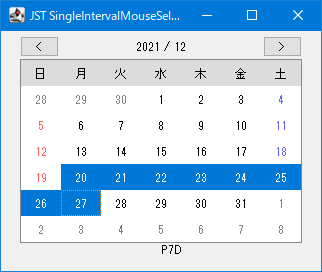
JListで作成したカレンダーでマウスドラッグによる日付の範囲選択を実行します。
Screenshot
Advertisement
Source Code Examples
class SingleIntervalMouseSelectionListener extends MouseInputAdapter {
  private int start = -1;

  @Override public void mousePressed(MouseEvent e) {
    JList<?> l = (JList<?>) e.getComponent();
    start = l.locationToIndex(e.getPoint());
    l.getSelectionModel().addSelectionInterval(start, start);
  }

  @Override public void mouseDragged(MouseEvent e) {
    JList<?> l = (JList<?>) e.getComponent();
    int end = l.locationToIndex(e.getPoint());
    l.getSelectionModel().addSelectionInterval(start, end);
  }
}
Explanation
上記のサンプルではJListで月のカーソルキー移動や、週を跨いた日付を範囲選択が可能なカレンダーを作成するで作成した「ニュースペーパー・スタイル」レイアウトを適用したJListカレンダーにMouseListener、MouseMotionListenerを追加してマウスドラッグによる日付の範囲選択を可能にしています。
- 日付の範囲なので連続範囲はひとつになるよう
ListSelectionModel.SINGLE_INTERVAL_SELECTIONをセレクションモードに設定 - 選択範囲の更新はDefaultListSelectionModel#addSelectionInterval(int, int) (Java Platform SE 8)やDefaultListSelectionModel#setSelectionInterval(int, int) (Java Platform SE 8)などで開始日と終了日を順不同でまとめて設定可能
- JList#setSelectedIndices(int%5B%5D) (Java Platform SE 8)で選択インデックスの配列を作成して範囲選択する方法もある
int min = Math.min(start, end); int max = Math.max(start, end); l.setSelectedIndices(IntStream.rangeClosed(min, max).toArray());- JListのアイテムを範囲指定で選択