Swing/RegisterFont のバックアップ(No.7)
- バックアップ一覧
- 差分 を表示
- 現在との差分 を表示
- 現在との差分 - Visual を表示
- ソース を表示
- Swing/RegisterFont へ行く。
- 1 (2009-10-19 (月) 14:42:22)
- 2 (2013-01-05 (土) 19:46:08)
- 3 (2013-05-26 (日) 06:34:34)
- 4 (2015-10-15 (木) 13:47:54)
- 5 (2017-04-18 (火) 15:10:45)
- 6 (2018-04-12 (木) 13:11:20)
- 7 (2020-04-09 (木) 14:39:56)
- 8 (2021-10-12 (火) 10:26:17)
- 9 (2025-01-03 (金) 08:57:02)
- 10 (2025-01-03 (金) 09:01:23)
- 11 (2025-01-03 (金) 09:02:38)
- 12 (2025-01-03 (金) 09:03:21)
- 13 (2025-01-03 (金) 09:04:02)
- 14 (2025-06-19 (木) 12:41:37)
- 15 (2025-06-19 (木) 12:43:47)
- category: swing
folder: RegisterFont
title: GraphicsEnvironmentにFontを登録して使用する
tags: [Font, GraphicsEnvironment, Html, StyleSheet, JLabel, JEditorPane, JTextPane]
author: aterai
pubdate: 2009-10-19T14:42:22+09:00
description: GraphicsEnvironmentにFontを登録して、Htmlタグなどで使用できるようにします。
image:
概要
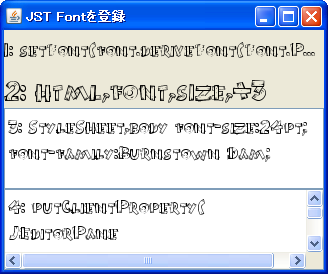
GraphicsEnvironmentにFontを登録して、Htmlタグなどで使用できるようにします。
Screenshot
Advertisement
サンプルコード
Font font = makeFont(getClass().getResource("Burnstown Dam.ttf"));
GraphicsEnvironment.getLocalGraphicsEnvironment().registerFont(font);
解説
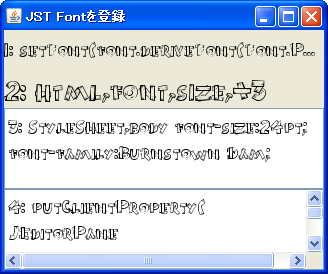
1:JLabel#setFont(...)メソッドでフォントを設定して使用2: 登録したフォントをHtmlタグで指定して使用label.setText("<html><font size='+3' face='Burnstown Dam'>2: html,font,size,+3</font></html>");
3:StyleSheetでbodyタグのフォントを設定して使用styleSheet.addRule("body {font-size: 24pt; font-family: Burnstown Dam;}");
4:JTextPane#setFont(...)メソッドでフォントを設定して使用bodyタグにデフォルトで指定されているフォントを無視して、JTextPaneのデフォルトのフォントを使用したい場合は、editor.putClientProperty(JEditorPane.HONOR_DISPLAY_PROPERTIES, Boolean.TRUE);とする必要がある- JEditorPaneに設定したフォントをHTMLテキストに適用する
参考リンク
- GraphicsEnvironment#registerFont(Font) (Java Platform SE 8)
- creamundo | Fuentes Gratis TrueType TTF
- Fontをファイルから取得
- Htmlを使ったJLabelとJEditorPaneの無効化
- JEditorPaneのHTMLEditorKitにCSSを適用