Swing/ComboBoxAsButtonWhenNotEditable のバックアップ(No.4)
- バックアップ一覧
- 差分 を表示
- 現在との差分 を表示
- 現在との差分 - Visual を表示
- ソース を表示
- Swing/ComboBoxAsButtonWhenNotEditable へ行く。
- category: swing folder: ComboBoxAsButtonWhenNotEditable title: NimbusLookAndFeelで編集不可のJComboBoxがボタンのようにロールオーバー表示するかを切り替える tags: [JComboBox, NimbusLookAndFeel, UIManager, UIDefaults] author: aterai pubdate: 2022-04-04T00:39:59+09:00 description: NimbusLookAndFeelで編集不可のJComboBox上にマウスカーソルが乗るとJButtonのようにロールオーバー状態を描画するかを切り替えます。 image: https://drive.google.com/uc?id=1xVBgDBbUhT_vj3ZWTBj_2wsijPDBy-I6
Summary
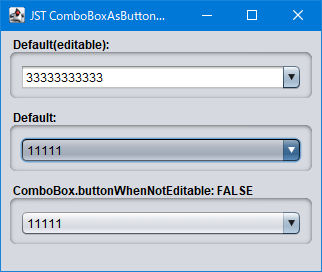
NimbusLookAndFeelで編集不可のJComboBox上にマウスカーソルが乗るとJButtonのようにロールオーバー状態を描画するかを切り替えます。
Screenshot
Advertisement
Source Code Examples
JComboBox<String> combo = new JComboBox<>(model);
UIDefaults d = UIManager.getLookAndFeelDefaults();
d.put("ComboBox.buttonWhenNotEditable", false);
combo.putClientProperty("Nimbus.Overrides", d);
combo.putClientProperty("Nimbus.Overrides.InheritDefaults", true);
解説
UIManager.put("ComboBox.buttonWhenNotEditable", true)NimbusLookAndFeelのデフォルトで編集不可のJComboBoxはJComboBox内部のArrowButton(JButton)と合わせてマウスカーソルでのロールオーバーやプレス状態で描画が変化するWindowsLookAndFeelではComboBox.buttonWhenNotEditableの設定には依存せず常にロールオーバー状態で描画が変化する- 編集可能な
JComboBoxではComboBox.buttonWhenNotEditableの設定は無効
UIManager.put("ComboBox.buttonWhenNotEditable", false)- 上記のサンプルでは
JComboBox#putClientProperty(...)で下のJComboBoxのみ編集不可のJComboBoxのロールオーバー描画を無効に設定している JComboBox内部のArrowButton(JButton)もロールオーバー描画が無効になるMetalLookAndFeelではComboBox.buttonWhenNotEditableの設定には依存せず常にロールオーバー状態で描画は変化しない
- 上記のサンプルでは