Swing/IconTitledBorder のバックアップ(No.3)
- バックアップ一覧
- 差分 を表示
- 現在との差分 を表示
- 現在との差分 - Visual を表示
- ソース を表示
- Swing/IconTitledBorder へ行く。
- 1 (2017-04-08 (土) 18:32:43)
- 2 (2018-03-29 (木) 17:38:27)
- 3 (2020-03-28 (土) 20:47:06)
- 4 (2021-10-02 (土) 21:16:04)
- 5 (2025-01-03 (金) 08:57:02)
- 6 (2025-01-03 (金) 09:01:23)
- 7 (2025-01-03 (金) 09:02:38)
- 8 (2025-01-03 (金) 09:03:21)
- 9 (2025-01-03 (金) 09:04:02)
- 10 (2025-06-19 (木) 12:41:37)
- 11 (2025-06-19 (木) 12:43:47)
- category: swing
folder: IconTitledBorder
title: TitledBorderのタイトルにアイコンを表示する
tags: [Border, TitledBorder, ImageIcon, Html]
author: aterai
pubdate: 2015-09-07T00:03:04+09:00
description: TitledBorderのタイトルに文字列だけでなく、アイコンを表示するように設定します。
image:

概要
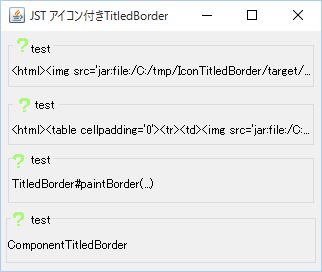
TitledBorderのタイトルに文字列だけでなく、アイコンを表示するように設定します。
Screenshot
Advertisement
サンプルコード
URL url = getClass().getResource("16x16.png");
String path = url.toString();
String title = String.format(
  "<html><table cellpadding='0'><tr><td><img src='%s'></td><td>test</td></tr></table></html>", path);
panel.setBorder(BorderFactory.createTitledBorder(title));
解説
<img>TitledBorder#setTitle(...)を使用して、<img>タグでアイコンを指定したHtmlテキストを設定Class#getResource(...)でアイコンのURLを取得し、<img>のソースに指定- アイコンとテキストのベースラインが揃っていない
<table>+<img><table><tr>タグを使用して、アイコンとテキストのベースラインを揃える
TitledBorder#paintBorder(...)TitledBorder#paintBorder(...)をオーバーライドしてアイコンを描画- タイトル文字列に半角空白で余白を作成し、位置を決め打ちでアイコンを描画
ComponentTitledBorder- BorderにJComponentを配置からマウスリスナーなどを削除し、アイコンを追加した
JLabelを適用
- BorderにJComponentを配置からマウスリスナーなどを削除し、アイコンを追加した