Swing/SpringLayout のバックアップ(No.20)
- バックアップ一覧
- 差分 を表示
- 現在との差分 を表示
- 現在との差分 - Visual を表示
- ソース を表示
- Swing/SpringLayout へ行く。
- 1 (2004-06-02 (水) 10:00:16)
- 2 (2004-09-08 (水) 09:44:17)
- 3 (2004-10-08 (金) 06:25:28)
- 4 (2004-11-04 (木) 10:11:41)
- 5 (2005-04-28 (木) 04:33:00)
- 6 (2005-05-10 (火) 05:35:19)
- 7 (2005-06-27 (月) 06:53:37)
- 8 (2005-07-06 (水) 23:54:35)
- 9 (2005-10-16 (日) 16:35:52)
- 10 (2006-02-27 (月) 16:28:56)
- 11 (2006-06-15 (木) 19:35:23)
- 12 (2006-10-23 (月) 15:43:37)
- 13 (2007-07-13 (金) 19:50:08)
- 14 (2007-10-24 (水) 00:33:37)
- 15 (2010-09-02 (木) 02:41:13)
- 16 (2010-09-02 (木) 07:01:18)
- 17 (2013-02-20 (水) 15:26:59)
- 18 (2013-04-05 (金) 17:59:33)
- 19 (2013-04-17 (水) 01:34:15)
- 20 (2013-08-17 (土) 01:11:40)
- 21 (2014-09-17 (水) 13:18:28)
- 22 (2014-10-23 (木) 00:56:02)
- 23 (2015-03-31 (火) 21:05:41)
- 24 (2016-05-24 (火) 22:25:15)
- 25 (2016-09-02 (金) 12:25:29)
- 26 (2017-03-30 (木) 14:07:31)
- 27 (2018-03-07 (水) 19:08:35)
- 28 (2020-03-11 (水) 19:23:51)
- 29 (2021-08-20 (金) 14:02:05)
- 30 (2025-01-03 (金) 08:57:02)
- 31 (2025-01-03 (金) 09:01:23)
- 32 (2025-01-03 (金) 09:02:38)
- 33 (2025-01-03 (金) 09:03:21)
- 34 (2025-01-03 (金) 09:04:02)
- 35 (2025-06-19 (木) 12:41:37)
- 36 (2025-06-19 (木) 12:43:47)
TITLE:SpringLayoutの使用
Posted by aterai at 2004-03-22
SpringLayoutの使用
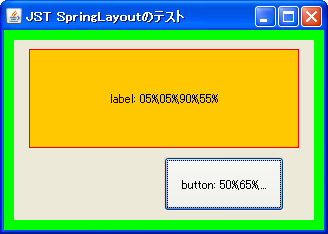
`SpringLayout`を使用して、各ラベルのサイズとパネルからの距離が一定の比率になるような配置を指定します。
- &jnlp;
- &jar;
- &zip;
サンプルコード
private static void setScaleAndAdd(JComponent parent, SpringLayout layout, JComponent child,
                                   float sx, float sy, float sw, float sh) {
  Spring panelw = layout.getConstraint(SpringLayout.WIDTH,  parent);
  Spring panelh = layout.getConstraint(SpringLayout.HEIGHT, parent);

  SpringLayout.Constraints c = layout.getConstraints(child);
  c.setX(Spring.scale(panelw, sx));
  c.setY(Spring.scale(panelh, sy));
  c.setWidth(Spring.scale(panelw,  sw));
  c.setHeight(Spring.scale(panelh, sh));

  parent.add(child);
}
//public void initLayout() {
//  SpringLayout layout = new SpringLayout();
//  Insets i = panel.getInsets();
//  int w = panel.getWidth()  - i.left - i.right;
//  int h = panel.getHeight() - i.top  - i.bottom;
//
//  l1.setPreferredSize(new Dimension( w*90/100, h*55/100 ) );
//  l2.setPreferredSize(new Dimension( w*40/100, h*30/100 ) );
//
//  layout.putConstraint(SpringLayout.WEST,  l1, w*5/100,
//                       SpringLayout.WEST,  panel);
//  layout.putConstraint(SpringLayout.NORTH, l1, h*5/100,
//                       SpringLayout.NORTH, panel);
//  layout.putConstraint(SpringLayout.WEST,  l2, w*50/100,
//                       SpringLayout.WEST,  panel);
//  //layout.putConstraint(SpringLayout.WEST, l2, 0, SpringLayout.WEST, l1);
//  layout.putConstraint(SpringLayout.SOUTH, l2, -h*5/100,
//                       SpringLayout.SOUTH, panel);
//
//  panel.setLayout(layout);
//  panel.revalidate();
//}
解説
上記のサンプルでは、`SpringLayoutを使って2つのJComponent`をパネル内にレイアウトしています。
パネルのサイズが変更されるたびに、各ラベルのサイズとパネルからの距離が一定の割合になるように設定し直しています(ただしパネルの余白は無視)。
- `
JLabel`- 幅はパネルの`
90%、高さは55%` - 左上座標は、親パネルの左上から`
x:5%,y:5%`の位置 パネルと自身の`WESTからの距離5%、パネルと自身のNORTHからの距離5%`
- 幅はパネルの`
- JButton
- 幅はパネルの`
40%、高さは30%` - 左上座標は、親パネルの左上から`
x:50%,y:65%`の位置 パネルと自身のWESTからの距離`50%、パネルと自身のSOUTHからの距離-5%`
- 幅はパネルの`
`SpringLayoutでは原点は左上で、右方向、下方向に正の値を取る為、例えばパネルの南辺からコンポーネントの南辺までの距離を指定する場合は、layout.putConstraint`する際にマイナスの値を指定する必要があります。
距離を`0にすることも可能で、例えばサンプルコードのコメントアウトされたような指定をすると、ラベル1、2`を左揃えで並べることができます。
コメント
- 以前の内容は、BoxLayoutでリスト状に並べるに移動しました。 -- aterai
- リスナーを使わなくても次ので出来ました。 --
panel.setLayout(layout);
Spring panelw = layout.getConstraint(SpringLayout.WIDTH, panel);
layout.getConstraints(name).setWidth(Spring.scale(panelw, 0.9f));
layout.getConstraints(name).setX(Spring.scale(panelw, 0.05f));
- ご指摘ありがとうございます。こんなメソッドがあったんですね。サンプルを全体的に修正してみました。 -- aterai