Swing/DisableOnBoundaryValues のバックアップ(No.12)
- バックアップ一覧
- 差分 を表示
- 現在との差分 を表示
- 現在との差分 - Visual を表示
- ソース を表示
- Swing/DisableOnBoundaryValues へ行く。
- 1 (2018-07-09 (月) 17:25:17)
- 2 (2019-03-20 (水) 23:26:46)
- 3 (2021-01-01 (金) 17:25:29)
- 4 (2022-04-18 (月) 15:54:53)
- 5 (2024-08-10 (土) 23:55:29)
- 6 (2025-01-03 (金) 08:57:02)
- 7 (2025-01-03 (金) 09:01:23)
- 8 (2025-01-03 (金) 09:02:38)
- 9 (2025-01-03 (金) 09:03:21)
- 10 (2025-01-03 (金) 09:04:02)
- 11 (2025-06-19 (木) 12:41:37)
- 12 (2025-06-19 (木) 12:43:47)
- category: swing folder: DisableOnBoundaryValues title: JSpinnerの値が境界値になった場合、ArrowButtonを無効にする tags: [JSpinner, ArrowButton, LookAndFeel, UIManager] author: aterai pubdate: 2018-06-25T16:59:19+09:00 description: JSpinnerの値が上限または下限になった場合、対応するArrowButtonを無効にしてクリック不可にします。 image: https://drive.google.com/uc?id=17ihoEGjXqC5qVXXM1yWqjYO93QjilZQHRw
Summary
JSpinnerの値が上限または下限になった場合、対応するArrowButtonを無効にしてクリック不可にします。
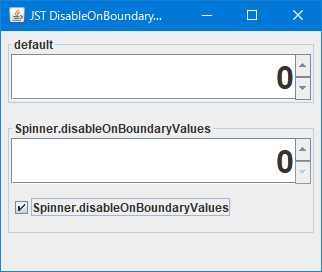
Screenshot
Advertisement
Source Code Examples
Description
UIManager.put("Spinner.disableOnBoundaryValues", Boolean.FALSE)- 境界値になっても
ArrowButtonはクリック可能だが値は変更されない MetalLookAndFeel、NimbusLookAndFeel、WindowsLookAndFeelなどでのデフォルト
- 境界値になっても
UIManager.put("Spinner.disableOnBoundaryValues", Boolean.TRUE)- 境界値になると
ArrowButtonは無効になりクリック不可で値の変更も不可になる GTKLookAndFeelでのデフォルトMetalLookAndFeelの場合のみ?起動中に切替可能
- 境界値になると