Swing/MenuArrowIcon のバックアップ(No.1)
- バックアップ一覧
- 差分 を表示
- 現在との差分 を表示
- 現在との差分 - Visual を表示
- ソース を表示
- Swing/MenuArrowIcon へ行く。
- 1 (2018-05-07 (月) 15:41:40)
- 2 (2018-05-09 (水) 20:28:40)
- 3 (2020-04-28 (火) 16:58:11)
- 4 (2021-10-29 (金) 10:11:03)
- 5 (2025-01-03 (金) 08:57:02)
- 6 (2025-01-03 (金) 09:01:23)
- 7 (2025-01-03 (金) 09:02:38)
- 8 (2025-01-03 (金) 09:03:21)
- 9 (2025-01-03 (金) 09:04:02)
- 10 (2025-06-19 (木) 12:41:37)
- 11 (2025-06-19 (木) 12:43:47)
- category: swing folder: MenuArrowIcon title: JMenuのArrowIconを変更する tags: [JMenu, Icon] author: aterai pubdate: 2018-05-07T15:33:15+09:00 description: JMenuの右端に表示されるArrowIconの形状や選択色などを変更します。 image: https://drive.google.com/uc?id=1hLKnZ5Zcz3tP7v6YtwXYj0Gd8CKvno8r6w
概要
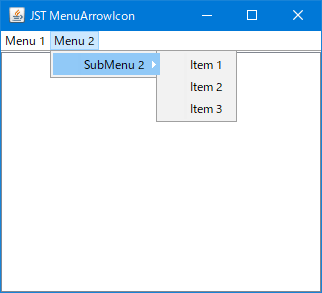
JMenuの右端に表示されるArrowIconの形状や選択色などを変更します。
Screenshot
Advertisement
サンプルコード
UIManager.put("Menu.arrowIcon", new ArrowIcon());
// ...
class ArrowIcon implements Icon {
  @Override public void paintIcon(Component c, Graphics g, int x, int y) {
    Graphics2D g2 = (Graphics2D) g.create();

    if (c instanceof AbstractButton && ((AbstractButton) c).getModel().isSelected()) {
      g2.setPaint(Color.WHITE);
    } else {
      g2.setPaint(Color.GRAY);
    }

    int w = getIconWidth() / 2;
    Path2D p = new Path2D.Double();
    p.moveTo(0, 0);
    p.lineTo(w, w);
    p.lineTo(0, getIconHeight());
    p.closePath();

    g2.translate(x, y);
    g2.fill(p);
    g2.dispose();
  }
  @Override public int getIconWidth() {
    return 8;
  }
  @Override public int getIconHeight() {
    return 8;
  }
}
解説
上記のサンプルでは、UIManager.put("Menu.arrowIcon", new Icon() {...})を使用してJMenuが使用するArrowIconを変更しています。
Icon#paintIcon(...)メソッドをオーバーライドし、JMenuが選択されている場合は色を変更if (c instanceof AbstractButton && ((AbstractButton) c).getModel().isSelected()) { g2.setPaint(Color.WHITE); } else { g2.setPaint(Color.GRAY); }WindowsLookAndFeelで、JMenuが選択されてサブメニューが表示されたときにArrowIconと重ならないように、アイコンの右側に余白を設定NimbusLookAndFeelではUIManager.put("Menu.arrowIcon", new Icon() {...})は無効、かつJMenuBarにMenu.arrowIconが不正に表示されてしまう?