Swing/DigitColoredPasswordField のバックアップ(No.1)
- バックアップ一覧
- 差分 を表示
- 現在との差分 を表示
- 現在との差分 - Visual を表示
- ソース を表示
- Swing/DigitColoredPasswordField へ行く。
- 1 (2025-08-11 (月) 02:17:37)
- 2 (2025-09-01 (月) 00:11:44)
- 3 (2026-01-04 (日) 06:46:23)
- category: swing folder: DigitColoredPasswordField title: JPasswordFieldの可視化で数字の色のみ変更 tags: [JPasswordField, JTextPane, CardLayout] author: aterai pubdate: 2025-08-11T02:08:27+09:00 description: JPasswordFieldに入力されたパスワードを可視化したとき、数値のみ色を変更して字形が似たアルファベットとの判別を簡単にします。 image: https://drive.google.com/uc?id=10UgQx9mHQ6E7ukNbuwvmDNPzHu6EZ4Xb
Summary
JPasswordFieldに入力されたパスワードを可視化したとき、数値のみ色を変更して字形が似たアルファベットとの判別を簡単にします。
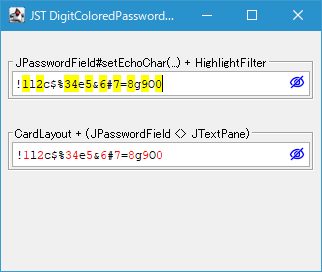
Screenshot
Advertisement
Source Code Examples
class HighlightDocumentFilter extends DocumentFilter {
  private final SimpleAttributeSet defAttr = new SimpleAttributeSet();
  private final SimpleAttributeSet numAttr = new SimpleAttributeSet();
  private final Pattern pattern = Pattern.compile("\\d");

  protected HighlightDocumentFilter() {
    super();
    StyleConstants.setForeground(defAttr, Color.BLACK);
    StyleConstants.setForeground(numAttr, Color.RED);
  }

  @Override public void insertString(
      FilterBypass fb, int offset, String text, AttributeSet attr)
      throws BadLocationException {
    super.insertString(fb, offset, text, attr);
    update(fb);
  }

  @Override public void remove(
      FilterBypass fb, int offset, int length)
      throws BadLocationException {
    super.remove(fb, offset, length);
    update(fb);
  }

  @Override public void replace(
      FilterBypass fb, int offset, int length, String text, AttributeSet attrs)
      throws BadLocationException {
    super.replace(fb, offset, length, text, attrs);
    update(fb);
  }

  private void update(FilterBypass fb) throws BadLocationException {
    StyledDocument doc = (StyledDocument) fb.getDocument();
    String text = doc.getText(0, doc.getLength());
    doc.setCharacterAttributes(0, doc.getLength(), defAttr, true);
    Matcher m = pattern.matcher(text);
    while (m.find()) {
      doc.setCharacterAttributes(m.start(), m.end() - m.start(), numAttr, true);
    }
  }
}
Description
JPasswordField#setEchoChar(...) + HighlightFilterJPasswordField#setEchoChar(...)をオーバーライドし、エコー文字として0(ヌル文字、\u0000)が設定されパスワードが可視化された場合は、数値のみHighlighterを使用して強調表示するDocumentFilterを追加0以外のエコー文字(このサンプルではUIManager.get("PasswordField.echoChar")で取得した文字)が設定された場合は、Highlighter#removeAllHighlights()で全ハイライトの削除と上記のDocumentFilterの削除を実行
class DigitHighlightPasswordField extends JPasswordField {
  protected DigitHighlightPasswordField(int columns) {
    super(columns);
  }

  @Override public void setEchoChar(char c) {
    super.setEchoChar(c);
    Document doc = getDocument();
    if (doc instanceof AbstractDocument) {
      boolean reveal = c == '\u0000';
      if (reveal) {
        ((AbstractDocument) doc).setDocumentFilter(new HighlightFilter(this));
        try {
          doc.remove(0, 0);
        } catch (BadLocationException ex) {
          UIManager.getLookAndFeel().provideErrorFeedback(this);
        }
      } else {
        getHighlighter().removeAllHighlights();
        ((AbstractDocument) doc).setDocumentFilter(null);
      }
    }
  }
}
CardLayout + (JPasswordField <> JTextPane)- JPasswordFieldでパスワードを可視化すると同様に
CardLayoutでJPasswordFieldと数値のみ文字色(スタイル)を変更するDocumentFilterを設定したJTextPaneを使用して可視状態を切り替える JTextPaneはJTextPaneを一行に制限してスタイル可能なJTextFieldとして使用すると同様に一行に制限JPasswordFieldとJTextPaneのDocumentは共有できないので切り替え時にDocument#getText(...)、Document#insertString(...)でパスワードをコピーしている
- JPasswordFieldでパスワードを可視化すると同様に