JTableのセル編集をUndo可能にする
Total: 235, Today: 3, Yesterday: 1
Posted by aterai at
Last-modified:
Summary
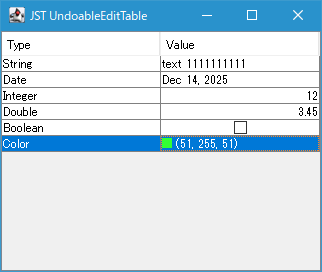
JTableのCellEditorで実行したセル値の編集をキー入力でUndo、Redo可能に設定します。
Screenshot
Advertisement
Source Code Examples
class PropertyTable extends JTable {
  private static final int TARGET_COLUMN = 1;
  private Class<?> editingClass;
  private final UndoManager undoManager = new UndoManager();

  protected PropertyTable(TableModel model) {
    super(model);
    initUndoActions();
  }

  private void initUndoActions() {
    String undo = "undo";
    String redo = "redo";
    ActionMap am = getActionMap();
    am.put(undo, new UndoAction());
    am.put(redo, new RedoAction());
    InputMap im = getInputMap(WHEN_ANCESTOR_OF_FOCUSED_COMPONENT);
    im.put(KeyStroke.getKeyStroke("ctrl Z"), undo);
    im.put(KeyStroke.getKeyStroke("ctrl shift Z"), redo);
    im.put(KeyStroke.getKeyStroke("ctrl Y"), redo);
  }


  @Override public void setValueAt(Object newValue, int row, int column) {
    if (isEditing()) {
      int mr = convertRowIndexToModel(row);
      int mc = convertColumnIndexToModel(column);
      Object oldValue = getValueAt(mr, mc);
      if (!Objects.equals(oldValue, newValue)) {
        TableModel m = getModel();
        undoManager.addEdit(new UndoableCellEdit(m, mr, mc, oldValue, newValue));
      }
    }
    super.setValueAt(newValue, row, column);
  }

  private class UndoAction extends AbstractAction {
    private UndoAction() {
      super("undo");
    }

    @Override public void actionPerformed(ActionEvent e) {
      try {
        undoManager.undo();
      } catch (CannotUndoException ex) {
        UIManager.getLookAndFeel().provideErrorFeedback(
            (Component) e.getSource());
      }
    }
  }

  private class RedoAction extends AbstractAction {
    private RedoAction() {
      super("redo");
    }

    @Override public void actionPerformed(ActionEvent e) {
      try {
        undoManager.redo();
      } catch (CannotRedoException ex) {
        UIManager.getLookAndFeel().provideErrorFeedback(
            (Component) e.getSource());
      }
    }
  }
  // ...
}
Description
JTable#setValueAt(...)をオーバーライドしてセル値が現在のセル値と異なる場合は以下のようなAbstractUndoableEditを実装するUndoableCellEditを作成し、UndoManager#addEdit(...)で追加UndoManager#undo()を実行するアクションをJTableのActionMapに追加し、Ctrl+Zキー入力でそのUndoアクションを実行するようInputMapに追加UndoManager#redo()を実行するアクションも同様にJTableのActionMapに追加し、Ctrl+Y、またはCtrl+Shift+Zキー入力でそのRedoアクションを実行するようInputMapに追加
class UndoableCellEdit extends AbstractUndoableEdit {
  private final TableModel model;
  private final int row;
  private final int column;
  private final Object oldValue;
  private final Object newValue;

  protected UndoableCellEdit(
        TableModel m, int row, int col, Object oldVal, Object newVal) {
    super();
    this.model = m;
    this.row = row;
    this.column = col;
    this.oldValue = oldVal;
    this.newValue = newVal;
  }

  @Override public void undo() {
    super.undo();
    model.setValueAt(oldValue, row, column);
  }

  @Override public void redo() {
    super.redo();
    model.setValueAt(newValue, row, column);
  }
}