JListのアイテムをグループ化する
Total: 209, Today: 3, Yesterday: 3
Posted by aterai at
Last-modified:
Summary
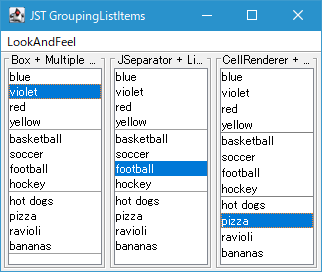
JListのアイテムをJSeparator、またはMatteBorderを使用してグループ化して表示します。
Screenshot
Advertisement
Source Code Examples
class GroupList<E> extends JList<E> {
  protected GroupList(ListModel<E> model) {
    super(model);
    initActionMpa(this);
  }

  @Override public void updateUI() {
    setCellRenderer(null);
    super.updateUI();
    ListCellRenderer<? super E> r = getCellRenderer();
    setCellRenderer((l, v, index, isSelected, cellHasFocus) ->
        v instanceof JSeparator
            ? (JSeparator) v
            : r.getListCellRendererComponent(l, v, index, isSelected, cellHasFocus)
    );
  }

  private static <E> void initActionMpa(JList<E> list) {
    ActionMap am = list.getActionMap();
    String selectPrevKey = "selectPreviousRow";
    Action prev = am.get(selectPrevKey);
    am.put(selectPrevKey, new AbstractAction() {
      @Override public void actionPerformed(ActionEvent e) {
        prev.actionPerformed(e);
        JList<?> l = (JList<?>) e.getSource();
        int index = l.getSelectedIndex();
        Object o = l.getModel().getElementAt(index);
        if (o instanceof JSeparator) {
          prev.actionPerformed(e);
        }
      }
    });
    String selectNextKey = "selectNextRow";
    Action next = am.get(selectNextKey);
    am.put(selectNextKey, new AbstractAction() {
      @Override public void actionPerformed(ActionEvent e) {
        next.actionPerformed(e);
        JList<?> l = (JList<?>) e.getSource();
        int index = l.getSelectedIndex();
        Object o = l.getModel().getElementAt(index);
        if (o instanceof JSeparator) {
          next.actionPerformed(e);
        }
      }
    });

    InputMap im = list.getInputMap(WHEN_ANCESTOR_OF_FOCUSED_COMPONENT);
    im.put(KeyStroke.getKeyStroke(KeyEvent.VK_UP, 0), selectPrevKey);
    im.put(KeyStroke.getKeyStroke(KeyEvent.VK_KP_UP, 0), selectPrevKey);
    im.put(KeyStroke.getKeyStroke(KeyEvent.VK_DOWN, 0), selectNextKey);
    im.put(KeyStroke.getKeyStroke(KeyEvent.VK_KP_DOWN, 0), selectNextKey);
  }
}
Description
Box + Multiple JList + JSeparator- グループごとに
JListを作成し、これをBox.createVerticalBox()で作成した垂直配置BoxにJSeparatorで区切って追加 - このサンプルでは
new JTree()で生成されるサンプルTreeModelを利用してリストアイテムのグループ化をテストしている - フォーカスオーナーである
JListのみ選択状態ハイライト表示するよう各JListのセルレンダラーを変更し、グループ内でのみ選択可能なように見せかけている - BoxLayoutでリスト状に並べる
- グループごとに
private static Container makeListBox() {
  Box box = Box.createVerticalBox();
  JTree tree = new JTree();
  TreeModel model = tree.getModel();
  TreeNode root = (TreeNode) model.getRoot();
  Collections.list((Enumeration<?>) root.children())
      .stream()
      .filter(TreeNode.class::isInstance)
      .map(TreeNode.class::cast)
      .forEach(node -> {
        if (!node.isLeaf()) {
          Enumeration<?> children = node.children();
          box.add(makeList(Collections.list(children).toArray()));
          box.add(new JSeparator());
        }
      });
  JPanel p = new JPanel(new BorderLayout());
  p.setBackground(UIManager.getColor("List.background"));
  p.add(box, BorderLayout.NORTH);
  return p;
}

private static JList<Object> makeList(Object... ary) {
  JList<Object> c = new JList<>(ary) {
    @Override public void updateUI() {
      setCellRenderer(null);
      super.updateUI();
      ListCellRenderer<? super Object> r = getCellRenderer();
      setCellRenderer((l, v, index, isSelected, cellHasFocus) -> {
        boolean selected = isSelected && l.isFocusOwner();
        return r.getListCellRendererComponent(l, v, index, selected, cellHasFocus);
      });
    }
  };
  int height = c.getPreferredSize().height;
  c.setMaximumSize(new Dimension(Short.MAX_VALUE, height));
  return c;
}
JSeparator + ListModel- レイアウトが
VERTICALのJListにListModel<Object>モデルを適用し、セルアイテムとしてJSeparatorを追加してグループ化の区切りとする - デフォルトセルレンダラーの描画用コンポーネントである
JLabelの代わりにListModel<Object>に追加されたJSeparatorをそのまま使用する - カーソルキーによる選択状態移動で
JSeparatorをスキップするようselectPreviousRow、selectNextRowを置き換えているselectPreviousRowExtendSelection、selectPreviousRowExtendSelectionアクションなどの選択行の拡張には未対応- マウスカーソルによる
JSeparatorアイテムの選択は制限していないが、表示上はJSeparatorは選択状態にならないようセルレンダラーで設定
- JComboBoxにJSeparatorを挿入
- レイアウトが
CellRenderer + MatteBordernew JTree()で生成されるサンプルTreeModelの2レベルのTreeNodeを利用してグループ化したListModel<TreeNode>を作成し、セルレンダラーで現在のTreeNodeとその次のTreeNodeの親TreeNodeが異なる場合は現在のTreeNodeがグループの末尾であるとしてMatteBorderで下線を設定しているJListのレイアウトは上記のJSeparator + ListModelと同様にセルが単一列で並ぶVERTICALの場合のみ想定している- JComboBoxのアイテムをBorderで修飾してグループ分け
class GroupBorderList<E extends TreeNode> extends JList<E> {
  protected GroupBorderList(ListModel<E> model) {
    super(model);
  }

  @Override public void updateUI() {
    setCellRenderer(null);
    super.updateUI();
    ListCellRenderer<? super E> r = getCellRenderer();
    setCellRenderer((l, v, index, isSelected, cellHasFocus) -> {
      Component c = r.getListCellRendererComponent(l, v, index, isSelected, cellHasFocus);
      if (c instanceof JComponent) {
        Border outside = getOutsideBorder(l, v, index);
        String key = isSelected ? "List.focusCellHighlightBorder" : "List.noFocusBorder";
        Border inside = UIManager.getBorder(key);
        ((JComponent) c).setBorder(BorderFactory.createCompoundBorder(outside, inside));
      }
      return c;
    });
  }

  private static Border getOutsideBorder(JList<?> l, TreeNode v, int index) {
    int max = l.getModel().getSize();
    int next = index + 1;
    Object n = next < max ? l.getModel().getElementAt(next) : null;
    return Optional.ofNullable(n)
        .filter(TreeNode.class::isInstance)
        .map(TreeNode.class::cast)
        .map(TreeNode::getParent)
        .filter(p -> !Objects.equals(p, v.getParent()))
        .<Border>map(p -> BorderFactory.createMatteBorder(0, 0, 1, 0, Color.GRAY))
        .orElseGet(() -> BorderFactory.createMatteBorder(0, 0, 1, 0, l.getBackground()));
  }
}