Swing/CellEditorLayout のバックアップ(No.9)
- バックアップ一覧
- 差分 を表示
- 現在との差分 を表示
- 現在との差分 - Visual を表示
- ソース を表示
- Swing/CellEditorLayout へ行く。
- 1 (2009-02-02 (月) 14:08:34)
- 2 (2009-08-10 (月) 15:49:29)
- 3 (2011-08-30 (火) 18:23:06)
- 4 (2011-08-30 (火) 19:41:13)
- 5 (2012-04-04 (水) 22:14:02)
- 6 (2013-01-12 (土) 21:47:35)
- 7 (2013-07-26 (金) 00:59:27)
- 8 (2013-08-28 (水) 12:19:34)
- 9 (2013-09-04 (水) 00:06:37)
- 10 (2013-10-12 (土) 20:15:23)
- 11 (2013-10-16 (水) 14:25:57)
- 12 (2014-03-26 (水) 16:07:48)
- 13 (2014-11-25 (火) 03:03:31)
- 14 (2015-02-10 (火) 15:22:44)
- 15 (2015-03-08 (日) 18:50:38)
- 16 (2016-03-09 (水) 21:11:39)
- 17 (2016-06-01 (水) 21:46:08)
- 18 (2017-03-29 (水) 15:42:49)
- 19 (2018-02-17 (土) 20:18:21)
- 20 (2020-01-29 (水) 18:48:08)
- 21 (2021-07-22 (木) 22:17:24)
- 22 (2024-02-03 (土) 13:57:30)
- 23 (2025-01-03 (金) 08:57:02)
- 24 (2025-01-03 (金) 09:01:23)
- 25 (2025-01-03 (金) 09:02:38)
- 26 (2025-01-03 (金) 09:03:21)
- 27 (2025-01-03 (金) 09:04:02)
- 28 (2025-06-19 (木) 12:41:37)
- 29 (2025-06-19 (木) 12:43:47)
TITLE:TableCellEditorのレイアウトを変更
Posted by aterai at 2009-02-02
TableCellEditorのレイアウトを変更
`TableCellEditorのレイアウトを変更して、CellEditorの隣にJButton`を配置します。
- &jnlp;
- &jar;
- &zip;
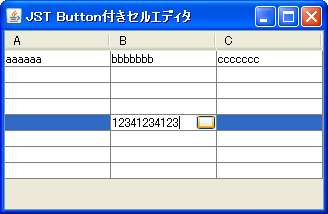
サンプルコード
class CustomComponentCellEditor extends DefaultCellEditor {
  protected final JTextField field;
  protected JButton button;
  private final JPanel panel = new JPanel(new BorderLayout());
  public CustomComponentCellEditor(JTextField field) {
    super(field);
    this.field = field;
    button = new JButton();
    button.setPreferredSize(new Dimension(25, 0));
    field.setBorder(BorderFactory.createEmptyBorder(0,2,0,0));
    panel.add(field);
    panel.add(button, BorderLayout.EAST);
    panel.setFocusable(false);
  }
  @Override public Component getTableCellEditorComponent(JTable table, Object value,
                         boolean isSelected, int row, int column) {
    //System.out.println("getTableCellEditorComponent");
    field.setText(value!=null?value.toString():"");
    EventQueue.invokeLater(new Runnable() {
      public void run() {
        field.requestFocusInWindow();
      }
    });
    return panel;
  }
  @Override public boolean isCellEditable(final java.util.EventObject e) {
    //System.out.println("isCellEditable");
    if(e instanceof KeyEvent) {
      //System.out.println("KeyEvent");
      EventQueue.invokeLater(new Runnable() {
        public void run() {
          char kc = ((KeyEvent)e).getKeyChar();
          if(!Character.isIdentifierIgnorable(kc)) {
            field.setText(field.getText()+kc);
          }
          field.setCaretPosition(field.getText().length());
          //field.requestFocusInWindow();
        }
      });
    }
    return super.isCellEditable(e);
  }
  @Override public Component getComponent() {
    return panel;
  }
}
解説
- `
0`列目- `
DefaultCellEditorを継承するCustomComponentCellEditor`を作成 - `
JTextField`をコンストラクタの引数にしているが、ダミー - 実体は`
JPanelで、これをセルエディタとして表示(TableCellEditor#getTableCellEditorComponentがJPanel`を返す) - この`
JPanelのレイアウトをBorderLayoutにして、JTextFieldとJButton`を配置 - `
TableCellEditor#getCellEditorValueはJTextFieldの値を返し、フォーカス、キー入力時の編集開始などもJTextField`になるように変更 - 参考: Swing - JTable editor issue:Darryl.Burke さんの投稿(2009/01/27 20:12 (reply 6 of 8))
- `
- `
1`列目- `
DefaultCellEditorを継承するCustomCellEditor`を作成 - `
JTextField`をコンストラクタの引数(セルエディタの実体)として使用 - `
JTextFieldにJButton`の幅の右余白を設定 - `
JTextFieldが表示されたときに、余白にJButtonをsetBounds`で配置 - 参考:JTextField内にアイコンを追加
- `
class CustomCellEditor extends DefaultCellEditor {
  private static final int BUTTON_WIDTH = 20;
  protected final JButton button = new JButton();
  public CustomCellEditor(final JTextField field) {
    super(field);
    field.setBorder(BorderFactory.createEmptyBorder(0,2,0,BUTTON_WIDTH));
    field.addHierarchyListener(new HierarchyListener() {
      public void hierarchyChanged(HierarchyEvent e) {
        if((e.getChangeFlags() & HierarchyEvent.SHOWING_CHANGED)!=0
            && field.isShowing()) {
          field.removeAll();
          field.add(button);
          Rectangle r = field.getBounds();
          button.setBounds(r.width-BUTTON_WIDTH, 0, BUTTON_WIDTH, r.height);
        }
      }
    });
  }
  @Override public Component getComponent() {
    //@see JTable#updateUI()
    SwingUtilities.updateComponentTreeUI(button);
    return super.getComponent();
  }
}
- `
2`列目- `
DefaultCellEditorを継承するCustomComponentCellEditor2`を作成 - `
JTextField`をコンストラクタの引数にしているが、ダミー - 実体は`
JPanelを継承するCustomComponent`で、これをセルエディタとして表示 - `
CustomComponent#processKeyBinding(...)をオーバーライドして、キー入力開始時にKeyboardFocusManager.getCurrentKeyboardFocusManager().redispatchEvent(field, e);`を呼び出している - あとは、`
0列目のCustomComponentCellEditor`と同様
- `
class CustomComponent extends JPanel {
  public final JTextField field = new JTextField();
  protected JButton button;
  public CustomComponent() {
    super(new BorderLayout(0,0));
    button = new JButton();
    this.add(field);
    this.add(button, BorderLayout.EAST);
  }
  @Override protected boolean processKeyBinding(
      final KeyStroke ks, final KeyEvent e, int condition, boolean pressed) {
    if(!field.isFocusOwner() && !pressed) {
      field.requestFocusInWindow();
      SwingUtilities.invokeLater(new Runnable() {
        @Override public void run() {
          KeyboardFocusManager.getCurrentKeyboardFocusManager()
            .redispatchEvent(field, e);
        }
      });
    }
    return super.processKeyBinding(ks, e, condition, pressed);
  }
}
class CustomComponentCellEditor2 extends DefaultCellEditor {
  private final CustomComponent component;
  public CustomComponentCellEditor2(CustomComponent component) {
    super(component.field);
    this.component = component;
  }
  @Override public Component getTableCellEditorComponent(JTable table,
        Object value, boolean isSelected, int row, int column) {
    component.field.setText(value!=null?value.toString():"");
    return component;
  }
  @Override public Component getComponent() {
    return component;
  }
}
- `
3`列目- デフォルト