Swing/ColorTransparencySelectionEnabled のバックアップ(No.7)
- バックアップ一覧
- 差分 を表示
- 現在との差分 を表示
- 現在との差分 - Visual を表示
- ソース を表示
- Swing/ColorTransparencySelectionEnabled へ行く。
- 1 (2022-11-14 (月) 00:21:25)
- 2 (2022-11-14 (月) 05:14:49)
- 3 (2022-11-15 (火) 11:14:49)
- 4 (2024-10-31 (木) 19:17:08)
- 5 (2024-11-03 (日) 19:51:27)
- 6 (2025-01-03 (金) 08:57:02)
- 7 (2025-01-03 (金) 09:01:23)
- 8 (2025-01-03 (金) 09:02:38)
- 9 (2025-01-03 (金) 09:03:21)
- 10 (2025-01-03 (金) 09:04:02)
- 11 (2025-06-19 (木) 12:41:37)
- 12 (2025-06-19 (木) 12:43:47)
- category: swing folder: ColorTransparencySelectionEnabled title: JColorChooserのRGB色選択パネルでアルファ設定用のJSliderとJSpinnerを無効化する tags: [JColorChooser] author: aterai pubdate: 2022-11-14T00:20:01+09:00 description: JColorChooserのRGB色選択パネルでアルファ設定用のJSliderとJSpinnerを無効化、または非表示に変更します。 image: https://drive.google.com/uc?id=1nww921FRgkdq2p5cjnEw1g7CBSXvt54I
Summary
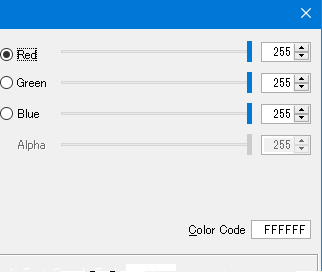
JColorChooserのRGB色選択パネルでアルファ設定用のJSliderとJSpinnerを無効化、または非表示に変更します。
Screenshot
Advertisement
サンプルコード
private void setTransparencySelectionEnabled(AbstractColorChooserPanel p) {
  String alphaName = UIManager.getString("ColorChooser.rgbAlphaText", p.getLocale());
  List<Component> list = SwingUtils.descendants(p).collect(Collectors.toList());
  int idx0 = 0;
  int idx1 = 0;
  int tgtIndex = 3; // rgbAlpha in RGB ColorChooserPanel
  // int tgtIndex = 4; // cmykAlpha in CMYK ColorChooserPanel
  for (Component c : list) {
    if (c instanceof JLabel && alphaName.equals(((JLabel) c).getText())) {
      setEnabledOrVisible(c);
    } else if (c instanceof JSlider) {
      if (idx0 == tgtIndex) {
        setEnabledOrVisible(c);
      }
      idx0 += 1;
    } else if (c instanceof JSpinner) {
      if (idx1 == tgtIndex) {
        setEnabledOrVisible(c);
      }
      idx1 += 1;
    }
  }
}

private void setEnabledOrVisible(Component c) {
  if (enabledRadio.isSelected()) {
    c.setEnabled(false);
  } else {
    c.setVisible(false);
  }
}
解説
上記のサンプルでは、RGB色選択パネルの子コンポーネントをすべて取得し、0番目に赤、1番目に緑、2番目に青、3番目にアルファ用のコンポーネントが出現すると想定してそれぞれ3番目に出現する
JSliderとJSpinnerを無効化、または非表示化しています。
Default- デフォルトの
JColorChooserはRGB色選択パネルのアルファやHSV色選択パネルで透明度が変更可能 GTKLookAndFeelのデフォルトJColorChooserにはRGB色選択パネルが存在せず、またアルファや透明度を設定不可?なのでJColorChooser#setUI(new BasicColorChooserUI())などを設定してエラーを回避する必要がある
- デフォルトの
setEnabled(false)- 名前が
UIManager.getString("ColorChooser.rgbAlphaText", getLocale())と一致するJLabelをsetEnabled(false)で無効化 3番目のアルファ用JSliderをsetEnabled(false)で無効化3番目のアルファ用JSpinnerをsetEnabled(false)で無効化
- 名前が
setVisible(false)- 名前が
UIManager.getString("ColorChooser.rgbAlphaText", getLocale())と一致するJLabelをc.setVisible(false)で非表示化 3番目のアルファ用JSliderをsetVisible(false)で非表示化3番目のアルファ用JSpinnerをsetVisible(false)で非表示化
- 名前が
Java 9からJColorChooser.showDialog(...)の引数が追加されて、RGB色選択パネルのアルファやHSV色選択パネルで透明度を非表示にしてJColorChooserを開くことが可能になった- [JDK-8051548] JColorChooser should have a way to disable transparency controls - Java Bug System
JButton button2 = new JButton("JColorChooser");
button2.addActionListener(e -> {
  Component rp = getRootPane();
  // JColorChooser should have a way to disable transparency controls
  // https://bugs.openjdk.org/browse/JDK-8051548
  // Java 9:
  Color c = JColorChooser.showDialog(
      rp, "", label.getBackground(), check.isSelected());
  label.setBackground(c);
});
- [JDK-8051548] JColorChooser should have a way to disable transparency controls - Java Bug System
参考リンク
- [JDK-8051548] JColorChooser should have a way to disable transparency controls - Java Bug System
- JColorChooser#showDialog(...) (Java SE 9 & JDK 9)
- なぜか
@since 9が付いていない? - [JDK-8343037] Missing @since tag on JColorChooser.showDialog overload - Java Bug Systemで修正される模様
- なぜか
- swing - Java 7 JColorChooser: Disable Transparency Slider - Stack Overflow
- リフレクションを使用してアルファ用コンポーネントを取得し無効化、非表示化を行っている
- JFileChooserがディレクトリ選択モードの場合ファイルフィルタ用のJComboBoxを無効化する