Swing/CheckIconInteriorBackground のバックアップ(No.7)
- バックアップ一覧
- 差分 を表示
- 現在との差分 を表示
- 現在との差分 - Visual を表示
- ソース を表示
- Swing/CheckIconInteriorBackground へ行く。
- category: swing folder: CheckIconInteriorBackground title: JCheckBoxとJRadioButtonのチェックアイコン背景色を変更する tags: [JCheckBox, JRadioButton, UIManager, WindowsClassicLookAndFeel] author: aterai pubdate: 2024-09-09T00:11:57+09:00 description: JCheckBoxとJRadioButtonのチェックアイコン内部の描画に使用するインテリア背景色などを変更します。 image: https://drive.google.com/uc?id=1JzmCMnRBtZ-wg0qef5-CsU8WgTo2XAF-
Summary
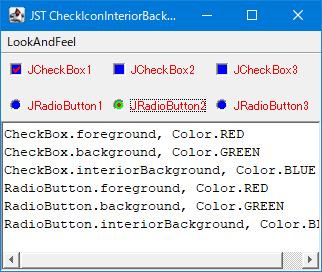
JCheckBoxとJRadioButtonのチェックアイコン内部の描画に使用するインテリア背景色などを変更します。
Screenshot
Advertisement
Source Code Examples
try {
  UIManager.setLookAndFeel(
    "com.sun.java.swing.plaf.windows.WindowsClassicLookAndFeel");
} catch (Exception ignored) {
  Toolkit.getDefaultToolkit().beep();
}
// System.setProperty("swing.noxp", "true");
UIManager.put("CheckBox.foreground", Color.RED);
UIManager.put("CheckBox.background", Color.GREEN);
UIManager.put("CheckBox.interiorBackground", Color.BLUE);

UIManager.put("RadioButton.foreground", Color.RED);
UIManager.put("RadioButton.background", Color.GREEN);
UIManager.put("RadioButton.interiorBackground", Color.BLUE);
Explanation
CheckBox.interiorBackground、RadioButton.interiorBackground:BLUEJCheckBoxとJRadioButtonのチェックアイコン内部のButtonModel#isPressed()でない、かつButtonModel#isArmed()でない状態の背景色WindowsClassicLookAndFeelでのみ有効CheckBoxMenuItem.interiorBackground、RadioButtonMenuItem.interiorBackgroundは存在せず無効
CheckBox.background、RadioButton.background:GREENJCheckBoxとJRadioButtonのラベル背景色- このサンプルでは
JCheckBox#setOpaque(false)を設定してラベルの背景を描画しないよう設定している
- このサンプルでは
WindowsClassicLookAndFeelの場合、ButtonModel#isPressed()、かつButtonModel#isArmed()状態のチェックアイコン内部の背景色も共有している
CheckBox.foreground、RadioButton.foreground:REDJCheckBoxとJRadioButtonのラベル文字色WindowsClassicLookAndFeelの場合、チェックアイコンのチェックマーク色も共有しているMotifLookAndFeelの場合、JCheckBoxのチェックマーク色のみ変更可能で、JRadioButtonのチェックマーク色は変更不可