Swing/MenuBarOverflowMenu のバックアップ(No.2)
- バックアップ一覧
- 差分 を表示
- 現在との差分 を表示
- 現在との差分 - Visual を表示
- ソース を表示
- Swing/MenuBarOverflowMenu へ行く。
- 1 (2025-08-18 (月) 01:16:28)
- 2 (2025-08-22 (金) 11:46:43)
- 3 (2025-08-23 (土) 22:10:59)
- category: swing folder: MenuBarOverflowMenu title: JMenuBarからあふれたJMenuをオーバーフローメニューに移動する tags: [JMenu, JMenuBar, JPopupMenu, FlowLayout] author: aterai pubdate: 2025-08-18T01:13:09+09:00 description: JMenuBarの表示幅に収まらずにあふれてしまうJMenuを新規作成したオーバーフロー用メニューに移動して表示可能にします。 image: https://drive.google.com/uc?id=1awkuBPpsKphzVEF-qzWtIGBO9Ec8rdh7
Summary
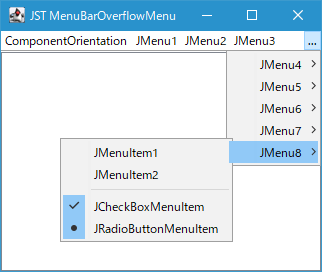
JMenuBarの表示幅に収まらずにあふれてしまうJMenuを新規作成したオーバーフロー用メニューに移動して表示可能にします。
Screenshot
Advertisement
Source Code Examples
class OverflowMenuLayout extends FlowLayout {
  public final JMenu overflowMenu = new JMenu("...");

  protected OverflowMenuLayout() {
    super(LEADING, 0, 0);
  }

  @Override public void layoutContainer(Container target) {
    super.layoutContainer(target);
    Rectangle r = SwingUtilities.calculateInnerArea((JComponent) target, null);
    int num = target.getComponentCount();
    if (target.getComponent(num - 1).getY() > r.y + getVgap()) {
      target.add(overflowMenu);
      overflowMenu.setSize(overflowMenu.getPreferredSize());
      int popupX;
      if (target.getComponentOrientation().isLeftToRight()) {
        popupX = r.x + r.width - overflowMenu.getSize().width;
      } else {
        popupX = r.x;
      }
      overflowMenu.setLocation(popupX, r.y);
      overflowMenu.setVisible(true);
    }
    if (target.isAncestorOf(overflowMenu)) {
      Arrays.stream(target.getComponents())
          .filter(c -> shouldMoveToPopup(target, c))
          .forEach(overflowMenu::add);
      // `getPopupMenu().pack()` is not necessary in Java 8,
      // but if you do not do this in Java 21,
      // the JPopupMenu may not be displayed correctly.
      overflowMenu.getPopupMenu().pack();
    }
  }

  private boolean shouldMoveToPopup(Container target, Component c) {
    Insets insets = target.getInsets();
    int y = insets.top + getVgap();
    Point pt = overflowMenu.getLocation();
    if (!target.getComponentOrientation().isLeftToRight()) {
      pt.x += overflowMenu.getWidth();
    }
    boolean b = !Objects.equals(c, overflowMenu) && c.getBounds().contains(pt);
    return c.getY() > y || b;
  }

  @Override public Dimension preferredLayoutSize(Container target) {
    overflowMenu.setVisible(false);
    target.remove(overflowMenu);
    for (Component c : overflowMenu.getPopupMenu().getComponents()) {
      target.add(c);
    }
    overflowMenu.removeAll();
    return super.preferredLayoutSize(target);
  }
}
Description
JMenuBarのレイアウトをFlowLayoutを継承するLayoutManagerに変更FlowLayout#layoutContainer(...)をオーバーライドして、JMenuのy座標を調査して2行目に配置されている場合はあふれているとみなし、そのJMenuをJMenuBarからオーバーフロー用JMenuに移動- または、
JMenuがあふれていない場合でもその領域がJMenuBarの右端(ComponentOrientation.RIGHT_TO_LEFTの場合は左端)に追加したオーバーフロー用JMenuと重なる場合はオーバーフロー用JMenuに移動Java 21+Windows 10環境では、あふれたJMenuをすべて移動した後にoverflowMenu.getPopupMenu().pack()を実行しないとオーバーフロー用JMenuから開くJPopupMenuの表示がおかしくなる場合がある(JMenuItemのテキストなどが重なったり途切れたりする)Java 8+Windows 10環境では、pack()しなくても特に問題なく表示可能
LookAndFeelを変更したときオーバーフロー用JMenuがJMenuBarに配置されていない場合でもUIを更新するよう、以下のようにSwingUtilities.updateComponentTreeUI(menu)を実行する必要があるJMenuBar menuBar = new JMenuBar() { @Override public void updateUI() { super.updateUI(); LayoutManager lm = getLayout(); if (lm instanceof OverflowMenuLayout) { JMenu menu = ((OverflowMenuLayout) lm).overflowMenu; SwingUtilities.updateComponentTreeUI(menu); } } }; menuBar.setLayout(new OverflowMenuLayout());
Reference
- Menu bar overflow menu - November 2018 (version 1.30) - Visual Studio Code UPDATES
- JMenuBarのJMenuを折り返し