Swing/WeeklyScheduleCalendar のバックアップ(No.1)
- バックアップ一覧
- 差分 を表示
- 現在との差分 を表示
- 現在との差分 - Visual を表示
- ソース を表示
- Swing/WeeklyScheduleCalendar へ行く。
- 1 (2026-03-23 (月) 00:44:42)
- category: swing folder: WeeklyScheduleCalendar title: JTabbedPaneで週間予定カレンダーを作成する title-en: Create a weekly schedule with JTabbedPane tags: [JTabbedPane, Calendar] author: aterai pubdate: 2026-03-23T00:37:51+09:00 description: JTabbedPaneのタブで一週間分の日付と曜日を表示し、それを選択可能な週間予定カレンダーを作成します。 summary-jp: JTabbedPaneのタブで一週間分の日付と曜日を表示し、それを選択可能な週間予定カレンダーを作成します。 summary-en: Display the dates and days of the week for one week in the tabs of JTabbedPane, and create a selectable weekly schedule calendar. image: https://drive.google.com/uc?id=1plUBZ-4brv2IUHWM7wNkV2mat5e8IW_w
Summary
JTabbedPaneのタブで一週間分の日付と曜日を表示し、それを選択可能な週間予定カレンダーを作成します。
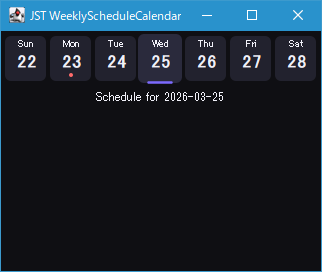
Screenshot
Advertisement
Source Code Examples
JTabbedPane tabs = new ClippedTitleTabbedPane();
Locale locale = Locale.getDefault();
LocalDate today = LocalDate.now(ZoneId.systemDefault());
DayOfWeek firstDay = WeekFields.of(locale).getFirstDayOfWeek();
LocalDate startOfWeek = today.with(TemporalAdjusters.previousOrSame(firstDay));
for (int i = 0; i < DayOfWeek.values().length; i++) {
  LocalDate date = startOfWeek.plusDays(i);
  tabs.addTab("", makeTabContent(date));
  tabs.setTabComponentAt(i, makeDayTab(date, today, locale));
}
// ...
private static JPanel makeDayTab(LocalDate date, LocalDate today, Locale locale) {
  String dayName = date.getDayOfWeek().getDisplayName(TextStyle.SHORT, locale);
  JLabel lblDay = new JLabel(dayName, SwingConstants.CENTER);
  lblDay.setFont(lblDay.getFont().deriveFont(11f));
  lblDay.setForeground(ModernTabbedPaneUI.TEXT_PRIMARY);

  String dayOfMonth = String.valueOf(date.getDayOfMonth());
  JLabel lblDate = new JLabel(dayOfMonth, SwingConstants.CENTER);
  lblDate.setFont(lblDate.getFont().deriveFont(Font.BOLD, 18f));
  lblDate.setForeground(ModernTabbedPaneUI.TEXT_PRIMARY);

  JPanel panel = new JPanel(new BorderLayout(0, 2));
  panel.setOpaque(false);
  panel.setBorder(BorderFactory.createEmptyBorder(2, 2, 2, 2));
  panel.add(lblDay, BorderLayout.NORTH);
  panel.add(lblDate);
  panel.add(makeIndicator(date, today), BorderLayout.SOUTH);
  return panel;
}
Description
- ロケールに基づいた週の開始曜日から一週間分のカレンダーを
JTabbedPaneのタブに配置 JPanelでタブコンポーネントを作成し、その上部に曜日、中央に日付、下部に本日インジケーターを表示- 本日より前の週の開始曜日が最初に出現する日付を
LocalDate startOfWeek = today.with(TemporalAdjusters.previousOrSame(firstDay))で取得DayOfWeek firstDay = WeekFields.of(locale).getFirstDayOfWeek(); int diff = today.getDayOfWeek().getValue() - firstDay.getValue(); if (diff < 0) { diff += DayOfWeek.values().length; } LocalDate startOfWeek = today.minusDays(diff); // startOfWeek = today.with(TemporalAdjusters.previousOrSame(firstDay));
JTabbedPaneの幅に収まる範囲で、各タブの幅が均等かつ最大になるよう調整JTabbedPaneの見た目はタブの縁やフォーカスなどの描画を無効にしたBasicTabbedPaneUIを作成して変更