Swing/LocalizedYearMonthPattern のバックアップ(No.1)
- バックアップ一覧
- 差分 を表示
- 現在との差分 を表示
- 現在との差分 - Visual を表示
- ソース を表示
- Swing/LocalizedYearMonthPattern へ行く。
- 1 (2025-07-14 (月) 02:00:51)
- category: swing folder: LocalizedYearMonthPattern title: Localeに対応した順序の年月パターンでカレンダータイトルを表示する tags: [Locale, JTable, DateTimeFormatter, Calendar] author: aterai pubdate: 2025-07-14T01:57:37+09:00 description: Localeに応じた年月の表示順序でDateTimeFormatterを作成し、カレンダータイトル文字列として表示するよう設定します。 image: https://drive.google.com/uc?id=1oAoT-MkwgVgmcyfiD4ZfQL7kNNZ4H8zX
Summary
Localeに応じた年月の表示順序でDateTimeFormatterを作成し、カレンダータイトル文字列として表示するよう設定します。
Screenshot
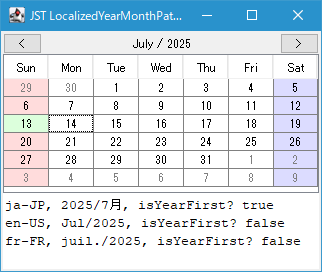
Advertisement
Source Code Examples
public static String getLocalizedPattern(Locale locale) {
  // DateFormat formatter = DateFormat.getDateInstance(DateFormat.LONG, locale);
  // return ((SimpleDateFormat) formatter).toLocalizedPattern();
  return DateTimeFormatterBuilder.getLocalizedDateTimePattern(
      FormatStyle.LONG, null, Chronology.ofLocale(locale), locale);
}

public static DateTimeFormatter getLocalizedYearMonthFormatter(Locale locale) {
  String localizedPattern = getLocalizedPattern(locale);
  String year = find(localizedPattern, Pattern.compile("(y+)"));
  String month = find(localizedPattern, Pattern.compile("(M+)"));
  String pattern = isYearFirst(locale) ? year + " / " + month : month + " / " + year;
  return DateTimeFormatter.ofPattern(pattern);
}

public static String find(String str, Pattern ptn) {
  Matcher matcher = ptn.matcher(str);
  return matcher.find() ? matcher.group(1) : "";
}

public static boolean isYearFirst(Locale locale) {
  String localizedPattern = getLocalizedPattern(locale);
  int yearIndex = localizedPattern.indexOf('y');
  int monthIndex = localizedPattern.indexOf('M');
  return yearIndex != -1 && monthIndex != -1 && yearIndex < monthIndex;
}
Description
- DateTimeFormatterBuilder.getLocalizedDateTimePattern(...)メソッドを使用して指定した
Locale固有の日付スタイル書式設定パターンを取得Java 8以前では*1.toLocalizedPattern()などで日付パターンを取得可能
- 日付パターンを年シンボル
y、月シンボルMで検索し、年が月より先か後かを判断してローカライズされた年と月のパターンでDateTimeFormatterを生成 LocalDate#format(formatter.withLocale(locale))でLocalDateから日時を除いたローカライズ済みの年月文字列にフォーマットしてカレンダータイトルとして設定public void updateMonthView(LocalDate localDate) { currentLocalDate = localDate; Locale locale = Locale.getDefault(); DateTimeFormatter formatter = CalendarUtils.getLocalizedYearMonthFormatter(locale); monthLabel.setText(localDate.format(formatter.withLocale(locale))); monthTable.setModel(new CalendarViewTableModel(localDate)); }
Reference
- DateTimeFormatterBuilder#getLocalizedDateTimePattern(...) (Java Platform SE 8)
- java - How do I get localized date pattern string? - Stack Overflow
- ICU - International Components for Unicodeを使用して年月
DateFormat.YEAR_MONTHのみのパターンを生成する方法などが紹介されている
- ICU - International Components for Unicodeを使用して年月