Swing/ContainerOrderFocusTraversalPolicy のバックアップ(No.1)
- バックアップ一覧
- 差分 を表示
- 現在との差分 を表示
- 現在との差分 - Visual を表示
- ソース を表示
- Swing/ContainerOrderFocusTraversalPolicy へ行く。
- category: swing folder: ContainerOrderFocusTraversalPolicy title: ComponentのFocus移動をContainerに追加した順番に設定する tags: [Container, Component, Focus, FocusTraversalPolicy, LayoutManager] author: aterai pubdate: 2024-01-01T12:39:23+09:00 description: ComponentのFocus移動を親Containerに追加した順番で循環するContainerOrderFocusTraversalPolicyを設定します。 image: https://drive.google.com/uc?id=1lG6lBzr-HmSWdfylbxnJpFOe7x-0HfBZ
概要
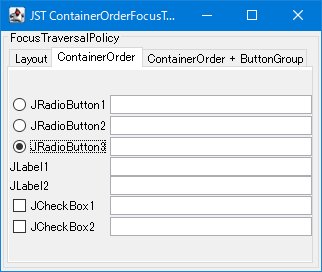
ComponentのFocus移動を親Containerに追加した順番で循環するContainerOrderFocusTraversalPolicyを設定します。
Screenshot
Advertisement
サンプルコード
JPanel p = new JPanel(new GridBagLayout());
p.setFocusTraversalPolicy(new ContainerOrderFocusTraversalPolicy());
p.setFocusTraversalPolicyProvider(true);
p.setFocusable(false);
GridBagConstraints gbc = new GridBagConstraints();
gbc.fill = GridBagConstraints.HORIZONTAL;
gbc.gridx = 1;
List<JComponent> list = Arrays.asList(
    new JRadioButton("JRadioButton1"),
    new JRadioButton("JRadioButton2"),
    new JRadioButton("JRadioButton3", true),
    new JLabel("JLabel1"),
    new JLabel("JLabel2"),
    new JCheckBox("JCheckBox1"),
    new JCheckBox("JCheckBox2"));
for (JComponent c : list) {
  if (c instanceof JRadioButton) {
    group.add((JRadioButton) c);
  } else if (c instanceof JLabel) {
    c.setFocusable(false);
  }
  p.add(c, gbc);
}
gbc.gridx = 2;
gbc.weightx = 1.0;
list.forEach(c -> p.add(new JTextField(), gbc));
解説
LayoutFocusTraversalPolicySwingの軽量コンポーネントのデフォルトContainerOrderFocusTraversalPolicyを継承するDefaultFocusTraversalPolicyはAWTの重量コンポーネント用のデフォルトDefaultFocusTraversalPolicy#accept(...)をオーバーライドして軽量コンポーネントは拒否するので、JPanelなどの軽量コンポーネントにDefaultFocusTraversalPolicyを設定するとタブキーによる子コンポーネントのフォーカス移動が不可になる
- 追加順ではなくレイアウトされた座標などに従って(
SortingFocusTraversalPolicyやLayoutComparatorを参照)フォーカス移動するため、たとえばこのサンプルのJRadioButtonの次のフォーカスは右隣のJTextFieldになる
ContainerOrderFocusTraversalPolicy- コンポーネントの追加順(
Container#getComponentZOrder(...)で取得可能なZ軸順インデックス)でフォーカス移動するFocusTraversalPolicy - たとえばこのサンプルの
JRadioButtonの次のフォーカスはJCheckBoxになる- タブキーによるフォーカス移動で
JRadioButtonの次がJRadioButtonにならないのは、同一ButtonGroup内のボタンはスキップするようBasicButtonUIで設定されているため LayoutFocusTraversalPolicyではJLabelのようなJComponent.WHEN_FOCUSED時のInputMapが存在しないコンポーネントは自動的にフォーカス移動対象外となるが、ContainerOrderFocusTraversalPolicyはそうではないので、このサンプルのJLabelにはsetFocusable(false)を設定することでフォーカス移動の対象から除外している
- タブキーによるフォーカス移動で
- コンポーネントの追加順(
ContainerOrderFocusTraversalPolicy+ButtonGroupFocusTraversalPolicy- ButtonGroup内で最初にフォーカスを取得するJRadioButtonを変更する同様、
ContainerOrderFocusTraversalPolicy#getDefaultComponent(...)をオーバーライドして選択状態のJRadioButtonに初期フォーカスを設定
- ButtonGroup内で最初にフォーカスを取得するJRadioButtonを変更する同様、
参考リンク
- Focusの移動
- [AWTフォーカス・サブシステム](https://docs.oracle.com/javase/jp/8/docs/api/java/awt/doc-files/FocusSpec.html)
- JRadioButtonの選択アイコンを除いたテキスト先頭をJLabelと揃える
JColorChooserの色選択パネルにContainerOrderFocusTraversalPolicyが使用されている
- ButtonGroup内で最初にフォーカスを取得するJRadioButtonを変更する