Swing/CheckBoxForMultipleSelectionsInListCell のバックアップ(No.1)
- バックアップ一覧
- 差分 を表示
- 現在との差分 を表示
- 現在との差分 - Visual を表示
- ソース を表示
- Swing/CheckBoxForMultipleSelectionsInListCell へ行く。
- 1 (2025-09-29 (月) 01:30:08)
- 2 (2025-09-29 (月) 01:32:29)
- 3 (2025-09-29 (月) 01:42:26)
- category: swing folder: CheckBoxForMultipleSelectionsInListCell title: JListのセルにJCheckBoxを追加しマウス操作のみでの複数選択を可能にする tags: [JList, JCheckBox] author: aterai pubdate: 2025-09-29T01:26:58+09:00 description: JListのセルにJCheckBoxを追加し、これをマウスでクリックするとセルの選択・解除が可能になるよう設定します。 image: https://drive.google.com/uc?id=16ajpRoiXha8UyLtOVhkZiLdq5w1LKnsA
Summary
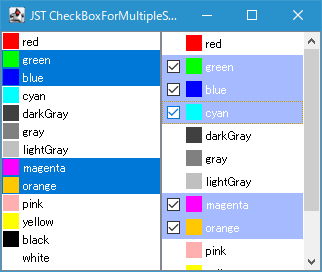
JListのセルにJCheckBoxを追加し、これをマウスでクリックするとセルの選択・解除が可能になるよう設定します。
Screenshot
Advertisement
Source Code Examples
private void cellPressed(MouseEvent e, int index) {
  if (SwingUtilities.isLeftMouseButton(e) && e.getClickCount() > 1) {
    ListItem item = getModel().getElementAt(index);
    JOptionPane.showMessageDialog(getRootPane(), item.getTitle());
  } else {
    checkedIndex = -1;
    getCheckBoxAt(e, index).ifPresent(button -> {
      checkedIndex = index;
      if (isSelectedIndex(index)) {
        removeSelectionInterval(index, index);
      } else {
        setSelectionInterval(index, index);
      }
    });
  }
}

private Optional<Component> getCheckBoxAt(MouseEvent e, int index) {
  JList<E> list = RubberBandSelectionList.this;
  boolean b = e.isShiftDown() || e.isControlDown() || e.isAltDown();
  return b ? Optional.empty() : getDeepestBoxAt(list, index, e.getPoint());
}

private Optional<Component> getDeepestBoxAt(JList<E> list, int index, Point pt) {
  E proto = list.getPrototypeCellValue();
  ListCellRenderer<? super E> cr = list.getCellRenderer();
  Component c = cr.getListCellRendererComponent(list, proto, index, false, false);
  Rectangle r = list.getCellBounds(index, index);
  c.setBounds(r);
  pt.translate(-r.x, -r.y);
  return Optional.ofNullable(SwingUtilities.getDeepestComponentAt(c, pt.x, pt.y))
      .filter(b -> b instanceof JCheckBox || b instanceof Box.Filler);
}
Description
- セル選択、セル選択解除を実行する機能はJListのセルに項目選択チェックボックスを追加するで使用した
MouseListenerとほぼ同じ- 範囲選択機能などは除去している
- セルがクリックされたときその位置に存在するコンポーネントを検索する方法もほぼ同様で
SwingUtilities.getDeepestComponentAt(...)メソッドを使用しているが、こちらのサンプルではJCheckBoxを非表示にする場合は代わりにBox.Fillerを追加してセルとラベルの間隔を維持するセルレンダラーを作成しているため、クリック位置の最深部のコンポーネントがBox.Fillerの場合もJCheckBoxがクリックされたと判断している