Swing/ColorPicker のバックアップ(No.3)
- バックアップ一覧
- 差分 を表示
- 現在との差分 を表示
- 現在との差分 - Visual を表示
- ソース を表示
- Swing/ColorPicker へ行く。
- category: swing folder: ColorPicker title: JLabel上に表示した画像のクリックした位置の色を取得する tags: [JLabel, ImageIcon, MouseListener, Graphics] author: aterai pubdate: 2021-07-05T03:02:53+09:00 description: JLabelにIconとして画像を表示し、その画像をマウスでクリックした位置の色を取得します。 image: https://drive.google.com/uc?id=1Q-RhXizUQcuAu_FPuY4zPAwSVpeGHsnk
Summary
JLabelにIconとして画像を表示し、その画像をマウスでクリックした位置の色を取得します。
Screenshot
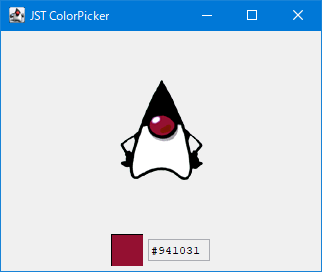
Advertisement
サンプルコード
JLabel label = new JLabel(new ImageIcon(image));
label.addMouseListener(new MouseAdapter() {
  @Override public void mousePressed(MouseEvent e) {
    updateViewRect(label);
    Point pt = e.getPoint();
    if (iconRect.contains(pt)) {
      int argb = image.getRGB(pt.x - iconRect.x, pt.y - iconRect.y);
      field.setText(String.format("#%06X", argb & 0x00_FF_FF_FF));
      sample.setIcon(new ColorIcon(new Color(argb, true)));
    }
  }
});
解説
ImageIO.read(...)で画像ファイルをBufferedImageとして読み込むJLabelにnew ImageIcon(BufferedImage)で作成したIconを設定JLabelにMouseListenerを追加してマウスクリック位置を取得JLabel内のIcon表示領域をSwingUtilities.layoutCompoundLabel(...)で更新JLabel上のマウスクリック位置をIcon(BufferedImage)の座標に変換し、BufferedImage#getRGB(...)メソッドで整数型ピクセル値で色を取得- 取得した色から
Iconを生成してサンプル表示用のJLabelに設定 - 取得した色を
16進数カラーコードの6桁文字列に変換してJTextFieldに設定
- 取得した色から