Swing/WindowClosingAction のバックアップ(No.10)
- バックアップ一覧
- 差分 を表示
- 現在との差分 を表示
- 現在との差分 - Visual を表示
- ソース を表示
- Swing/WindowClosingAction へ行く。
- 1 (2013-03-11 (月) 17:04:49)
- 2 (2013-03-11 (月) 18:26:13)
- 3 (2014-02-12 (水) 19:03:01)
- 4 (2015-01-15 (木) 15:21:03)
- 5 (2015-03-27 (金) 21:45:22)
- 6 (2017-02-15 (水) 13:55:11)
- 7 (2017-12-27 (水) 18:28:59)
- 8 (2019-12-24 (火) 20:42:29)
- 9 (2021-07-02 (金) 17:54:04)
- 10 (2025-01-03 (金) 08:57:02)
- 11 (2025-01-03 (金) 09:01:23)
- 12 (2025-01-03 (金) 09:02:38)
- 13 (2025-01-03 (金) 09:03:21)
- 14 (2025-01-03 (金) 09:04:02)
- 15 (2025-06-19 (木) 12:41:37)
- 16 (2025-06-19 (木) 12:43:47)
- category: swing
folder: WindowClosingAction
title: JPopupMenuなどからWindowを閉じる
tags: [JFrame, JPopupMenu, JToolBar, JMenuBar]
author: aterai
pubdate: 2013-03-11T17:04:49+09:00
description: JPopupMenuや、JToolBarなどに親Windowを閉じるためのActionを作成します。
image:
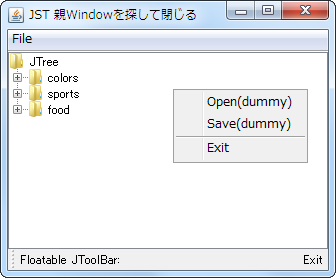
概要
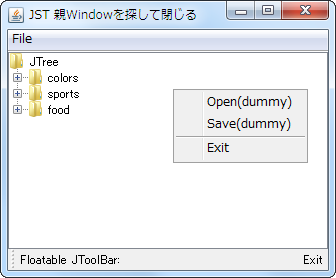
JPopupMenuや、JToolBarなどに親Windowを閉じるためのActionを作成します。
Screenshot
Advertisement
サンプルコード
private static class ExitAction extends AbstractAction {
  public ExitAction() {
    super("Exit");
  }

  @Override public void actionPerformed(ActionEvent e) {
    JComponent c = (JComponent) e.getSource();
    Window window = null;
    Container parent = c.getParent();
    if (parent instanceof JPopupMenu) {
      JPopupMenu popup = (JPopupMenu) parent;
      JComponent invoker = (JComponent) popup.getInvoker();
      window = SwingUtilities.getWindowAncestor(invoker);
    } else if (parent instanceof JToolBar) {
      JToolBar toolbar = (JToolBar) parent;
      if (((BasicToolBarUI) toolbar.getUI()).isFloating()) {
        window = SwingUtilities.getWindowAncestor(toolbar).getOwner();
      } else {
        window = SwingUtilities.getWindowAncestor(toolbar);
      }
    } else {
      Component invoker = c.getParent();
      window = SwingUtilities.getWindowAncestor(invoker);
    }
    if (window != null) {
      // window.dispose();
      window.dispatchEvent(new WindowEvent(window, WindowEvent.WINDOW_CLOSING));
    }
  }
}
解説
上記のサンプルでは、親となるJFrameを取得してwindow.dispatchEvent(new WindowEvent(window, WindowEvent.WINDOW_CLOSING));を使用し、これを閉じるためのイベントを実行しています。
コンポーネントの親Windowを取得する場合、SwingUtilities.getWindowAncestor(...)などが使用可能ですが、HeavyWeightWindowなJPopupMenuやFloating中のJToolBarでは親Windowとは異なるWindowが使用されるので注意が必要です。
JPopupMenuJPopupMenu#getInvoker()を使用してJComponent#setComponentPopupMenu(popup)で設定したコンポーネントを取得し、SwingUtilities.getWindowAncestor(...)メソッドで親Windowを取得
JMenuBarSwingUtilities.getWindowAncestor(...)メソッドで自身の親Windowを取得
JToolBar- 移動中の場合、
JComponent#setComponentPopupMenu(toolbar)メソッドで取得した移動中のWindowの親WindowをWindow#getOwner()で取得 - 移動中では無い場合、
SwingUtilities.getWindowAncestor(toolbar)メソッドで自身の親Windowを取得
- 移動中の場合、