Swing/DisableRightDoubleClickMaximize のバックアップ(No.2)
- バックアップ一覧
- 差分 を表示
- 現在との差分 を表示
- 現在との差分 - Visual を表示
- ソース を表示
- Swing/DisableRightDoubleClickMaximize へ行く。
- 1 (2021-09-06 (月) 06:33:14)
- 2 (2021-09-06 (月) 08:45:26)
- 3 (2021-09-07 (火) 16:58:53)
- 4 (2023-09-15 (金) 12:48:42)
- 5 (2025-01-03 (金) 08:57:02)
- 6 (2025-01-03 (金) 09:01:23)
- 7 (2025-01-03 (金) 09:02:38)
- 8 (2025-01-03 (金) 09:03:21)
- 9 (2025-01-03 (金) 09:04:02)
- 10 (2025-06-19 (木) 12:41:37)
- 11 (2025-06-19 (木) 12:43:47)
- category: swing folder: DisableRightDoubleClickMaximize title: JInternalFrameのタイトルを右ダブルクリックしても最大化しないよう設定する tags: [JInternalFrame, JDesktopPane, JLayer, JPopupMenu, WindowsLookAndFeel] author: aterai pubdate: 2021-09-06T06:25:10+09:00 description: JInternalFrameのタイトルバーをマウスの右ボタンでダブルクリックしても最大化しないよう設定します。 image: https://drive.google.com/uc?id=1GTvnCmjM652oDX-Ncal6SVoBNtXxxwvd
概要
JInternalFrameのタイトルバーをマウスの右ボタンでダブルクリックしても最大化しないよう設定します。
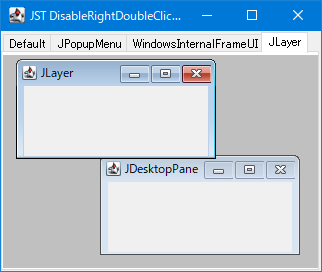
Screenshot
Advertisement
サンプルコード
class DesktopLayerUI extends LayerUI<JDesktopPane> {
  @Override public void installUI(JComponent c) {
    super.installUI(c);
    if (c instanceof JLayer) {
      ((JLayer<?>) c).setLayerEventMask(AWTEvent.MOUSE_EVENT_MASK | AWTEvent.MOUSE_MOTION_EVENT_MASK);
    }
  }

  @Override public void uninstallUI(JComponent c) {
    if (c instanceof JLayer) {
      ((JLayer<?>) c).setLayerEventMask(0);
    }
    super.uninstallUI(c);
  }

  @Override protected void processMouseEvent(MouseEvent e, JLayer<? extends JDesktopPane> l) {
    Component c = e.getComponent();
    Container p = SwingUtilities.getAncestorOfClass(BasicInternalFrameTitlePane.class, c);
    boolean b = c instanceof BasicInternalFrameTitlePane || p instanceof BasicInternalFrameTitlePane;
    boolean isRight = SwingUtilities.isRightMouseButton(e);
    if (b && isRight && e.getID() == MouseEvent.MOUSE_CLICKED && e.getClickCount() >= 2) {
      e.consume();
    }
  }

  @Override protected void processMouseMotionEvent(MouseEvent e, JLayer<? extends JDesktopPane> l) {
    boolean b = e.getComponent() instanceof JInternalFrame;
    boolean isRight = SwingUtilities.isRightMouseButton(e);
    if (b && isRight && e.getID() == MouseEvent.MOUSE_DRAGGED) {
      e.consume();
    }
  }
}
解説
DefaultWindows環境でWindowsLookAndFeelを使用する場合でもJInternalFrameのタイトルバーをマウスの右ボタンでダブルクリックするとそのJInternalFrameが最大化してしまう
JPopupMenu( (BasicInternalFrameUI) f.getUI()).getNorthPane()でタイトルバーを取得し、JComponent#setComponentPopupMenu(popup)でJPopupMenuを設定するとマウスの右ボタンクリックでJPopupMenuが開くので右ボタンのダブルクリックによる最大化は実行不可能になる- JInternalFrameにJPopupMenuを設定してタイトルを変更する
- タイトルバーから
JPopupMenuを開き、Escキー入力や別コンポーネントをクリックしてポップアップ表示をキャンセルすると再度タイトルバーを左クリックするまでJInternalFrameのリサイズが不可能になるバグ?が存在する
WindowsInternalFrameUIWidowsLookAndFeelでのみ動作を変更したい場合はWindowsInternalFrameUI#createBorderListener(...)メソッドをオーバーライドしてMouseInputAdapterを継承するBorderListenerがマウスの左ボタンにのみ反応するよう変更することで右ボタンのダブルクリックによる最大化を無効にする方法があるJInternalFrame f = new JInternalFrame("WindowsInternalFrameUI", true, true, true, true) { @Override public void updateUI() { super.updateUI(); setUI(new WindowsInternalFrameUI(this) { @Override protected MouseInputAdapter createBorderListener(JInternalFrame w) { return new BorderListener() { @Override public void mouseClicked(MouseEvent e) { if (SwingUtilities.isLeftMouseButton(e)) { super.mouseClicked(e); } } @Override public void mousePressed(MouseEvent e) { if (SwingUtilities.isLeftMouseButton(e)) { super.mousePressed(e); } } }; } }); } };
JLayerJDesktopPaneにJLayerを被せてJInternalFrameのタイトルバーがマウスの右ボタンでダブルクリックされた場合のマウスイベントを無視するJInternalFrameのシステムアイコンがダブルクリックされるとJInternalFrameは非表示になるが、このJLayerでは合わせてマウスの右ボタンでダブルクリックを無視するよう設定- さらにマウスの右ボタンでの
JInternalFrameのリサイズも無効化している
参考リンク
- JInternalFrameにJPopupMenuを設定してタイトルを変更する
- JComboBoxのドロップダウンリストで右クリックを無効化
- JMenuとJMenuItemで右クリックによる選択を無効にする